Watch the Opal launch video
Guardrails

Every agent. Every interaction. Under control.

Guardrails inspect what goes in and what comes out of every agent conversation. Deploy agents with confidence, knowing unsafe input is blocked and sensitive output never leaves.

Guardrails · input / outputscreening
input guardrail
unsafe request blocked
agent
processes clean input
keywordregexsemantic
output guardrailcard ****1234
The problem

Most AI deployments leave a gap.

When organizations deploy agents, the focus is usually on what agents can do. The harder question is what agents should never do.

Without enforcement at the content layer, agents can act on manipulative input, expose sensitive information, or return content that violates policy. Rules in a system prompt are a starting point. They are not a safeguard.

01

Unsafe input reaches the agent

Users may send requests that are harmful, manipulative, or in violation of policy. Without input-level screening, agents receive and act on them.

02

Sensitive data appears in responses

Agents working with organizational data can surface personally identifiable information, financial details, or other sensitive content in replies that should never contain it.

03

Policy violations slip through

Keyword lists catch what you can predict. They miss the things you cannot. Policy violations expressed in language that doesn't match an exact phrase go undetected.

What is a Guardrail?

A safeguard that runs automatically.

A Guardrail runs on agent input, agent output, or both. Before an agent acts on a user message, an input guardrail can screen it. Before a response reaches a user, an output guardrail can inspect it. Flagged content is handled according to a defined rule.

  1. 01

    Input and output control

    Attach a guardrail as an input guardrail to screen what users send, an output guardrail to screen what agents return, or both. Each instance is configured independently.

  2. 02

    Three detection methods

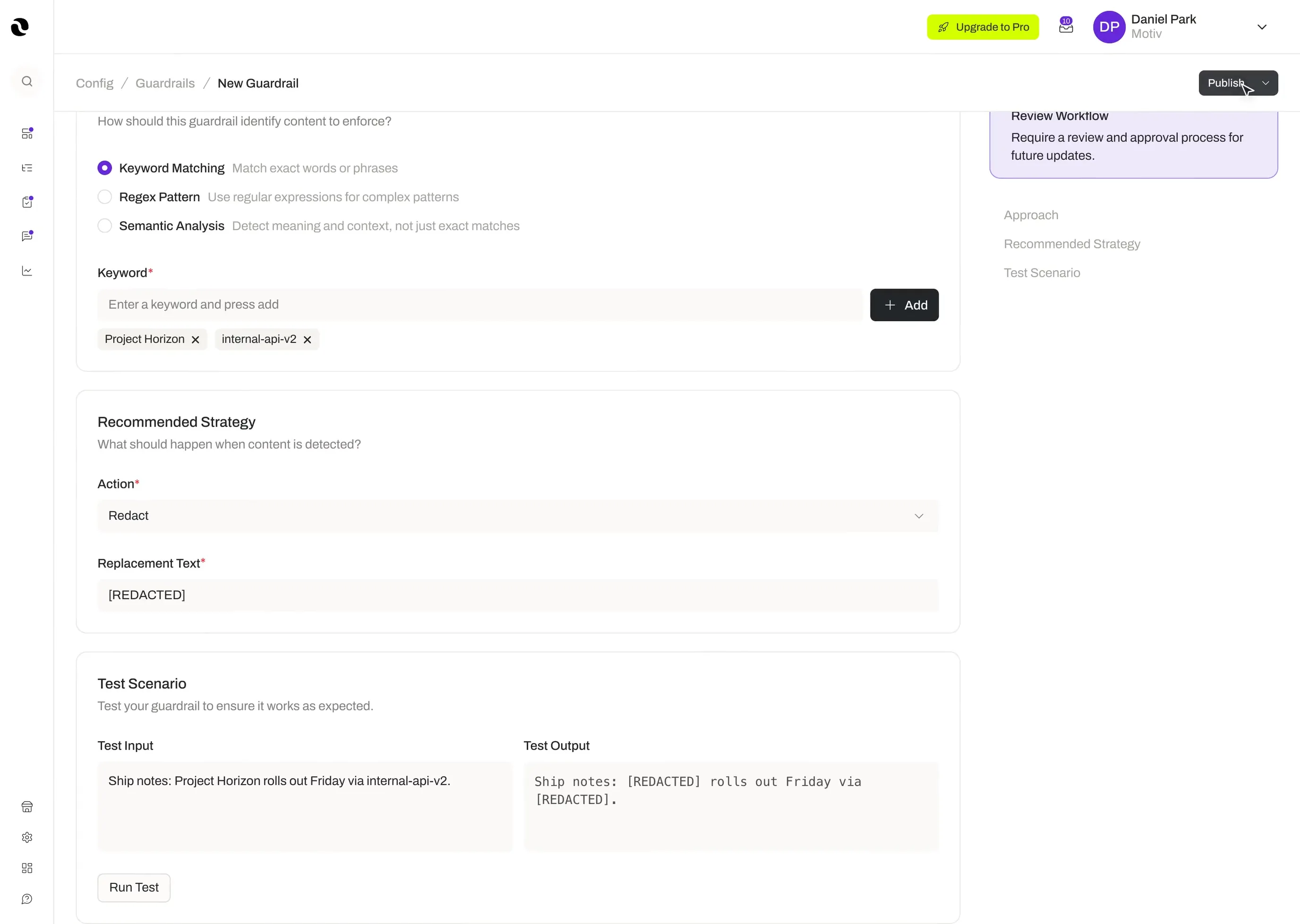
    Guardrails detect flagged content using keyword matching for exact words and phrases, regex pattern matching for complex formats like email addresses or API keys, and semantic analysis that understands meaning and context rather than exact text.

  3. 03

    Four handling approaches

    When content is flagged, the guardrail applies one of four responses: Redact, which replaces flagged content with a placeholder; Mask, which hides characters while optionally revealing a few (such as a credit card shown as ****1234); Hash, which replaces flagged content with a cryptographic hash; or Block, which stops the input or output entirely and displays a defined error message.

  4. 04

    Reusable across agents

    A single guardrail can be attached to multiple agents and agent templates. The recommended handling approach is set at the guardrail level but can be adjusted for each individual instance.

  5. 05

    No limit on coverage

    There is no limit on the number of guardrails that can be attached to a single agent or agent template. Stack as many as your policy requires.

  6. 06

    Consistent across templates

    Guardrails attached to an agent template apply wherever that template is used, so protections are consistent across every deployment.

Guardrail library · detection / actionactive
Canadian Passport Number
regex matching
mask
Financial Information
regex matching
mask
Health Information
semantic matching
redact
General PII
semantic matching
redact
Data Exfiltration
semantic matching
block
Confidential Information
keyword matching
hash
Content Moderation
semantic matching
block
Jailbreak Detection
semantic matching
block
Prompt Injection Defense
semantic matching
block
keyword · regex · semanticredact · hash · mask · block
How it works

From rule to enforcement.

Step 01

Create a guardrail

Open the Guardrails section of the platform. Choose a detection method: keyword matching, regex pattern, or semantic analysis. Define the handling approach for flagged content.

Step 02

Set the handling response

Choose how flagged content is handled. Redact it, mask it, hash it, or block it with a custom error message. This becomes the recommended default for the guardrail.

Step 03

Attach it to an agent

Add the guardrail to one or more agents or agent templates as an input guardrail, an output guardrail, or both. Adjust the handling approach per instance if needed.

Step 04

It runs automatically

Every interaction passes through the guardrail without any manual review required. Input guardrails run before the agent processes a message. Output guardrails run before a response is returned.

Step 05

Reuse across your workforce

One guardrail, many agents. Update the guardrail once and the change applies everywhere it is used.

Key benefits

Control at the content layer, everywhere agents work.

Deploy agents safely

Input guardrails catch unsafe or manipulative queries before an agent ever processes them. Agents do the work they are configured to do — nothing else.

Protect sensitive information

Output guardrails detect and handle personally identifiable information, financial data, and other sensitive content before it reaches a user. PII stays out of responses.

Enforce policy beyond keywords

Semantic analysis understands the meaning behind content, not just the words. Policy violations that bypass keyword filters are caught at the intent level.

Reusable and consistent

Build a guardrail once and apply it across agents and agent templates. Coverage is consistent, and updates propagate automatically.

Confidence at scale

As your agent workforce grows, Guardrails grow with it. Every new agent inherits the same standards without manual configuration per deployment.

See it in practice

How teams put guardrails to work.

Three real shapes of enforcement, from PII masking to prompt-injection defense.

Case 01
Financial Services

Compliance and PII protection

A compliance lead at a financial services company needs to ensure its customer-support agent never exposes account details or accepts inappropriate requests. She creates two guardrails: a semantic analysis guardrail to detect PII with a masking response, and a keyword matching guardrail to block offensive language with a custom error message. From then on, unsafe messages are blocked before the agent responds, and any account numbers in replies are automatically masked.

Detection
Semantic analysis + keyword matching
Handling
Mask · Block with custom error
Outcome
Account details never exposed
Case 02
Engineering

Data exfiltration protection

A security administrator at a software company wants to prevent an internal engineering agent from leaking API keys, access tokens, or internal source code. She creates output guardrails using regex pattern detection to catch key and token formats set to Redact, and semantic analysis to detect proprietary code and confidential content set to Block. Every response is inspected before it leaves the agent.

Detection
Regex patterns + semantic analysis
Handling
Redact · Block
Outcome
Keys and source code stay internal
Case 03
Public-Facing Agents

Prompt injection defense

A platform administrator is concerned that users may try to manipulate a public-facing agent into ignoring its instructions or revealing its configuration. He creates a semantic analysis input guardrail to detect prompt-injection intent and sets the handling approach to Block with a clear error message. Manipulative queries are caught and rejected before the agent can be influenced by them.

Detection
Semantic analysis (input)
Handling
Block with clear error message
Outcome
Manipulative queries rejected
Security and compliance

Enforcement you can prove, not just promise.

01

Role-Based Access Control

Guardrail creation and configuration is governed by role-based permissions. Only authorized users can create, edit, or attach guardrails.

02

Audit Log

All guardrail creation, modification, and attachment activity is recorded in the platform's Audit Log for full accountability.

03

Input and Output Enforcement

Guardrails run at both the input and output layer — every interaction is screened, not just a sample.

04

Zero Data Retention

Opal does not use customer data to train AI models. What flows through Guardrails stays within your organization's control.

05

Certifications

ISO 27001, ISO 42001, and SOC 2 Type II certifications are underway.

Deploy every agent with safeguards that scale.

Control at the content layer.

Guardrails give you control at the content layer — blocking unsafe input, protecting sensitive output, and enforcing policy across every agent in your digital workforce.