Watch the Opal launch video
Threads

Work with agents the way you actually think.

Threads are real-time conversations where people and agents work together inside a Space. Ask questions, direct work, bring in colleagues, and reach answers together — all in one live conversation.

Thread · launch messaginglive
youtagged in order

@research @copywriter draft the launch messaging for Tuesday.

@researchresponded 1st

Pulled the last three launches and the competitor positioning from Space knowledge.

@copywriterresponded 2nd

Three headline options drafted on top of that research. Ready for review.

@brand leadjoined the thread

Option two. Tighten the subhead and we ship it.

agents working
The gap between asking and doing

Most AI tools answer questions. Threads get things done.

A chat window that gives you a response is useful. A conversation where you can direct multiple agents, control the sequence, involve your colleagues, and refine in real time until the work is finished is something entirely different.

That is what Threads are built for.

01

An answer is not an outcome

A chat window that returns a response is useful. But the work rarely ends at the response — it ends when something is finished, reviewed, and agreed on.

02

One assistant is not a team

Real work draws on research, drafting, analysis, and review. A single conversation with a single model cannot bring those capabilities together in sequence.

03

Colleagues end up somewhere else

When the people who need to weigh in live in a different tool, the context gets copied, pasted, and lost on the way there.

Threads

A shared workspace for people and agents.

A Thread is a conversation created inside a Space. It is where real-time, collaborative work happens — between people and agents, together.

  1. 01

    Add people and agents

    Start by adding whoever belongs in the conversation. People and agents both participate in a Thread once added. Collaboration is intentional, not accidental.

  2. 02

    Invoke agents with @

    Tag an agent with @ to ask it to respond. Agents already added to the Thread are ready to contribute the moment they are called on.

  3. 03

    Control the sequence

    Tag multiple agents in a single message and they respond in the order they were tagged. The flow of a multi-agent conversation is predictable and entirely in your hands.

  4. 04

    Bring colleagues in

    Tag a colleague to send them a notification and pull them into the conversation. People and agents work in the same Thread — not in separate silos.

  5. 05

    Grounded responses

    Every agent responds with the Space's shared knowledge and its own Skills, Connectors, Tools, Widgets, and Guardrails behind it. Answers are informed, capable, and context-aware.

  6. 06

    One shared conversation

    Everyone works from the same Thread and the same agent responses. No duplication, no version drift, no separate conversations producing different results.

Thread · Q3 launch brief5 participants
You@research@analyst@writerBrand lead
Youtagged 3 agents

@research @analyst @writer put together the Q3 launch brief.

q3-goals.pdf4 pages
@researchstep 01

Gathered prior launches and competitor positioning from Space knowledge.

market-scan.md12 sources
competitors.csv38 rows
@analyststep 02

Sized the segments and flagged the two with the strongest pipeline.

segment-model.xlsx3 tabs
@writerstep 03

Brief drafted on top of both. Ready for a human check.

q3-launch-brief.docxdraft v1
Brand leadnotified · joined

Approved with one edit to the positioning line. Ship it.

q3-launch-brief.docxapproved v2
outcome reached · one shared thread
How Threads work

From question to outcome in a single conversation.

Step 01

Open a Thread

Create a Thread inside any Space. The Thread inherits the Space's knowledge, configuration, and access controls from the start.

Step 02

Add your participants

Add the agents and people who need to be part of this conversation. Participation is intentional — everyone added is ready to contribute.

Step 03

Direct the work

Tag agents with @ to invoke them. Tag multiple agents in one message and they respond in order. Ask follow-up questions, redirect, refine — the conversation evolves in real time.

Step 04

Loop in colleagues

Tag a colleague with @ and they receive a notification. They join the same Thread — reviewing agent responses, adding input, and collaborating alongside the agents in one shared conversation.

Step 05

Reach the outcome

Keep going until the work is done. Adjust direction as the conversation unfolds, without needing to set everything up in advance.

Why Threads

Real-time collaboration, purpose-built for agent work.

Work through problems in real time

Direct agents as the conversation unfolds and adjust course immediately. No need to specify everything upfront before the work begins.

Pull the right expertise together

Add multiple agents to a single conversation so different capabilities — research, drafting, analysis, review — come together around the same problem.

Keep the right people in the loop

Tag colleagues to notify them and bring them into the live conversation. People and agents collaborate together in one Thread rather than in separate channels.

Control who responds and when

Tag order is response order. Multi-agent conversations are predictable, sequenced, and intentional — not chaotic or unpredictable.

One conversation, no duplication

A shared Thread means everyone works from the same set of responses. No duplicate conversations, no conflicting outputs, no wasted effort.

Threads in action

How teams put Threads to work.

Three live conversations, each sequencing agents and colleagues toward a finished outcome.

Case 01
Marketing

Product launch messaging

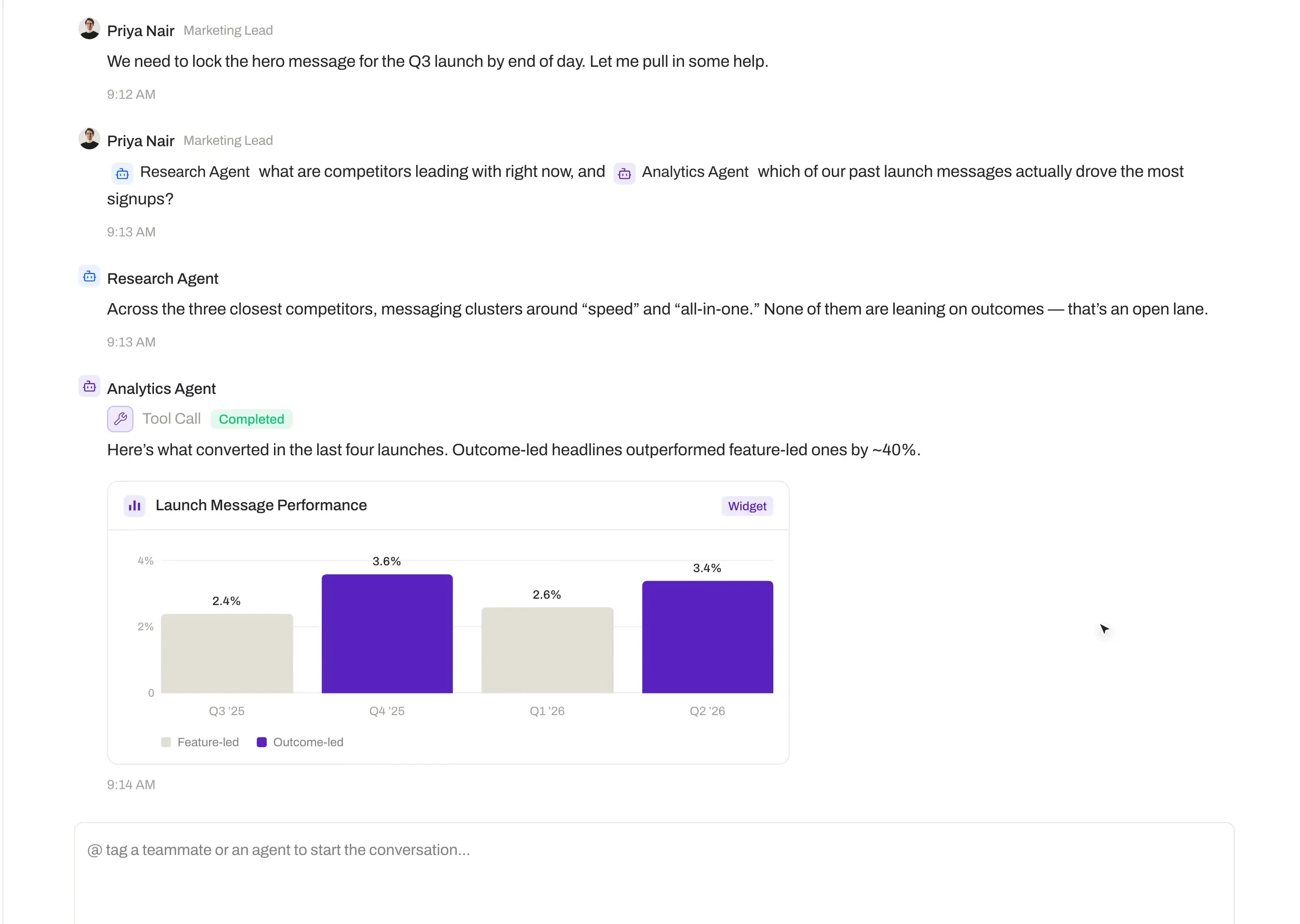
A marketing manager preparing a product launch opens a Thread in the team's Space and adds a Research Agent, a Copywriter Agent, and two colleagues. In a single message she tags the Research Agent first and the Copywriter Agent second — asking for a competitor positioning summary followed by launch messaging built on it. The Research Agent responds first; the Copywriter Agent builds directly on those findings. She then tags both colleagues, who join the same Thread, review the responses, and refine the tone in real time.

Participants
2 agents · 2 colleagues
Sequence
Research → copy
Outcome
Messaging refined in-thread
Case 02
Consulting

Client proposal preparation

A consulting team lead needs a proposal response before an afternoon deadline. She opens a Thread in the client Space and adds an Analysis Agent and a Writing Agent, along with a senior colleague to review. She tags the Analysis Agent for background on the client's industry and prior work, then tags the Writing Agent to draft the proposal structure from that context. With both outputs in the same Thread, she tags her colleague for a quick review — and the proposal is ready ahead of schedule.

Participants
2 agents · 1 reviewer
Sequence
Analysis → draft → review
Outcome
Proposal ready ahead of deadline
Case 03
Support

Technical escalation triage

A support team lead receives a complex escalation and is not sure which team should own it. He opens a Thread and adds a Knowledge Agent configured with product documentation, a Process Agent familiar with escalation routing, and an engineering SME. He describes the issue and tags the Knowledge Agent first, then the Process Agent. The Knowledge Agent identifies the relevant product behavior; the Process Agent recommends a routing path. He tags the SME with the Thread context already in place, who confirms the routing — and the escalation is resolved without a separate chain of emails.

Participants
2 agents · 1 SME
Sequence
Knowledge → routing → confirm
Outcome
Resolved without an email chain
Secure by design

Every conversation is governed and controlled.

01

Role-Based Access Control

Thread access is governed by Space-level permissions. Only members with appropriate roles can create Threads, add participants, or view conversation history.

02

Audit Log

Every Thread interaction is logged, giving administrators full visibility into who participated, when, and what was produced.

03

Guardrails

Every agent in a Thread operates within its configured Guardrails. Boundaries are enforced at the agent level, not added on afterward.

04

Zero Data Retention

Opal operates on a Zero Data Retention basis with AI model providers. Conversation content is not used to train external models.

05

Certifications

ISO 27001, ISO 42001, and SOC 2 Type II certifications are underway.

Threads

Bring people and agents together in one conversation.

Threads make real-time collaboration with agents as natural as a conversation. Start building on Opal today.