
Payouts
A payout is the money your organization receives for what other organizations adopt from your Marketplace listings.
Configuring your organization's payout settings and viewing its payout information are organization-level, finance-sensitive actions, so they depend on your organization's plan and the role permissions you have been granted. The access model is documented in one place: Access & Permissions.
Overview
A payout is the money your organization receives for what other organizations adopt from your Marketplace listings.
Payments are handled by the platform, and two currencies are involved. Buyers are charged in credits, the balance every organization uses to fund its usage of Opal. Sellers are paid out in US dollars, with the platform handling the currency conversion in between. Opal retains a 20% service fee on each transaction, and the remaining 80% is paid out to the seller.
Payout settings are the second of the two setup steps that turn an organization into a seller: before it can sell, an organization sets up a public-facing marketplace profile and configures its payout settings. Once both are in place, it can create listings for eligible resources.
That is what makes selling worth doing: resources your team has already built and proven internally — templates, MCP Servers, guardrails, skills, tool definitions, widgets — become a revenue stream, without your finance team having to run the transaction. Opal charges the buyer, converts the currency, takes its fee, and pays your organization the rest.
Key Capabilities
- Earn on resources you have already built. Paid listings turn proven internal work into revenue, on top of the value your organization already gets from using it.
- Get paid in US dollars. Buyers pay in credits; your organization receives its payouts in USD.
- Let the platform handle the conversion. Opal converts between the credits a buyer spends and the dollars a seller receives — there is nothing for either side to reconcile manually.
- Keep 80% of every transaction. Opal retains a 20% service fee on each transaction, and the remaining 80% is paid out to the seller.
- Earn in line with real usage. Each listing is priced against a usage-based pricing unit, so what a buyer is charged — and what you earn — tracks how much the resource is actually used.
- Set payouts up once, at organization level. Payout settings are managed alongside the organization's marketplace profile and listings, with its other organization settings.
How it Works
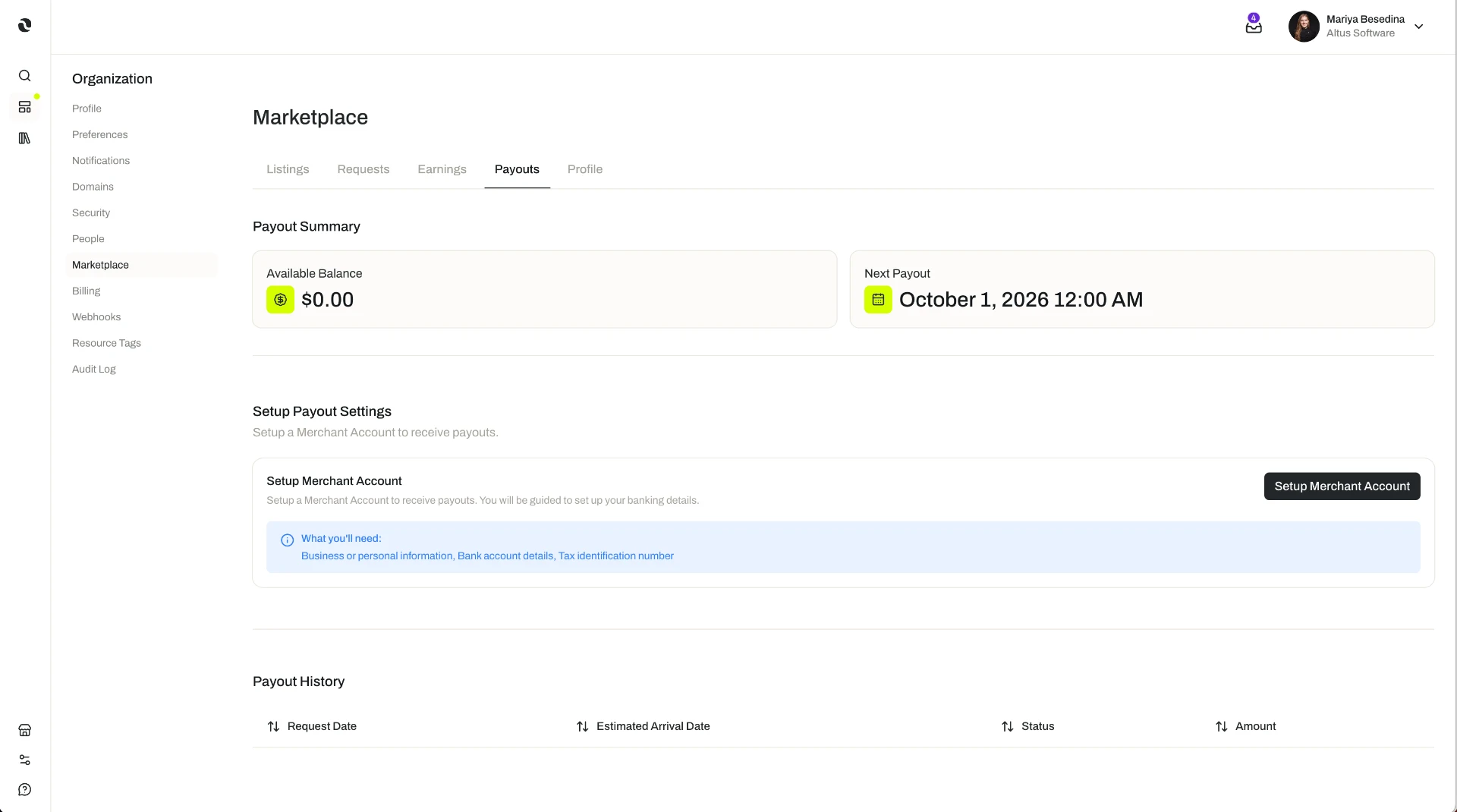
1. Configure payout settings before you sell
Before an organization can sell on the Marketplace, it sets up a public-facing marketplace profile and configures its payout settings. Payout settings determine how the organization is paid for what it sells.
Both steps are completed before the first listing is created — payout configuration on its own does not make an organization a seller, and neither does a profile on its own. See Marketplace Profile.
Payout settings sit with the organization rather than with an individual member, and they are managed at organization level alongside the marketplace profile and listings — which is why this is usually an administrator or finance task rather than a builder one.
2. Create a paid listing
With the profile and payout settings in place, your organization can create listings. When creating a listing, the seller sets a price — or makes the resource free — based on the resource type and its pricing unit. Pricing units are usage-based and fixed by the resource type: per 1M output tokens for an agent template, per 1K invocations for a guardrail, per 1K renders for a widget, and so on.
Pricing and listing management are covered in full on Listings.
3. The buyer is charged in credits
When a buying organization adopts a paid resource, it is charged in credits according to its usage of that resource against the listing's pricing unit. Credits are the balance an organization uses to fund its usage of Opal; see Credits.
4. Opal takes its fee, and you are paid in US dollars
Opal retains a 20% service fee on each transaction. The remaining 80% is paid out to the seller in US dollars, with the platform handling the currency conversion.
5. Credits in, dollars out: a worked example
Your organization lists an agent template it built in-house and prices it per 1M output tokens. Another organization adopts it and runs it.
- The buyer is charged in credits. Say their usage over a period amounts to a transaction of 500 credits.
- Opal retains its service fee. 20% of that transaction — the equivalent of 100 credits — is Opal's service fee.
- You are paid the rest, in dollars. The remaining 80% — the equivalent of 400 credits — is what your organization earns. The platform converts it and pays it out in US dollars.
The 500 credits here are illustrative; what holds for every transaction is the split — 20% retained by Opal, 80% paid out to the seller — and the direction of travel: credits in from the buyer, US dollars out to the seller.
Additional Notes
- Credits in, dollars out. The buyer's cost is measured in credits and the seller's earnings are delivered in US dollars. The platform bridges the two; neither side converts anything itself.
- The split applies per transaction. Every transaction is divided the same way: 20% service fee to Opal, 80% to the seller.
- Only paid listings generate payouts. A listing published for free is not charged to the buyer, so there is nothing to split or pay out. Publishing for free is still a normal way to share a resource.
- What you earn follows usage. Because pricing units are usage-based, a resource that is used heavily earns more than the same resource used occasionally.
- Payout settings are seller setup, not buyer setup. They are only needed to sell. Adopting resources from the Marketplace is funded by your organization's credits and has no payout configuration of its own.
- Payouts are separate from what your organization pays Opal. Subscription, seats, payment methods, and credit purchases are managed in the organization's billing settings; see Billing & Subscription.
- Short definitions of the terms used here are in one place: Glossary.
Related Features
- Marketplace Profile — The first half of seller setup: your organization's public presence on the Marketplace, configured before its first listing. Marketplace Profile
- Listings — What generates a payout: the resources you publish, priced against a usage-based pricing unit or offered for free. Listings
- Marketplace — The wider picture: discovering, publishing, and monetizing shared resources across organizations. Marketplace
- Credits — The balance buyers spend when they adopt a paid listing, and the currency the buyer side of every transaction is measured in. Credits
- Billing & Subscription — The other side of the organization's finances: billing profile, payment methods, subscription plan, and seats. Billing & Subscription
- Access & Permissions — The full access model behind plans, role permissions, and per-resource permissions. Access & Permissions
- Glossary — Short definitions of payouts, payout settings, the service fee, and the other terms used here. Glossary