
Marketplace Profile
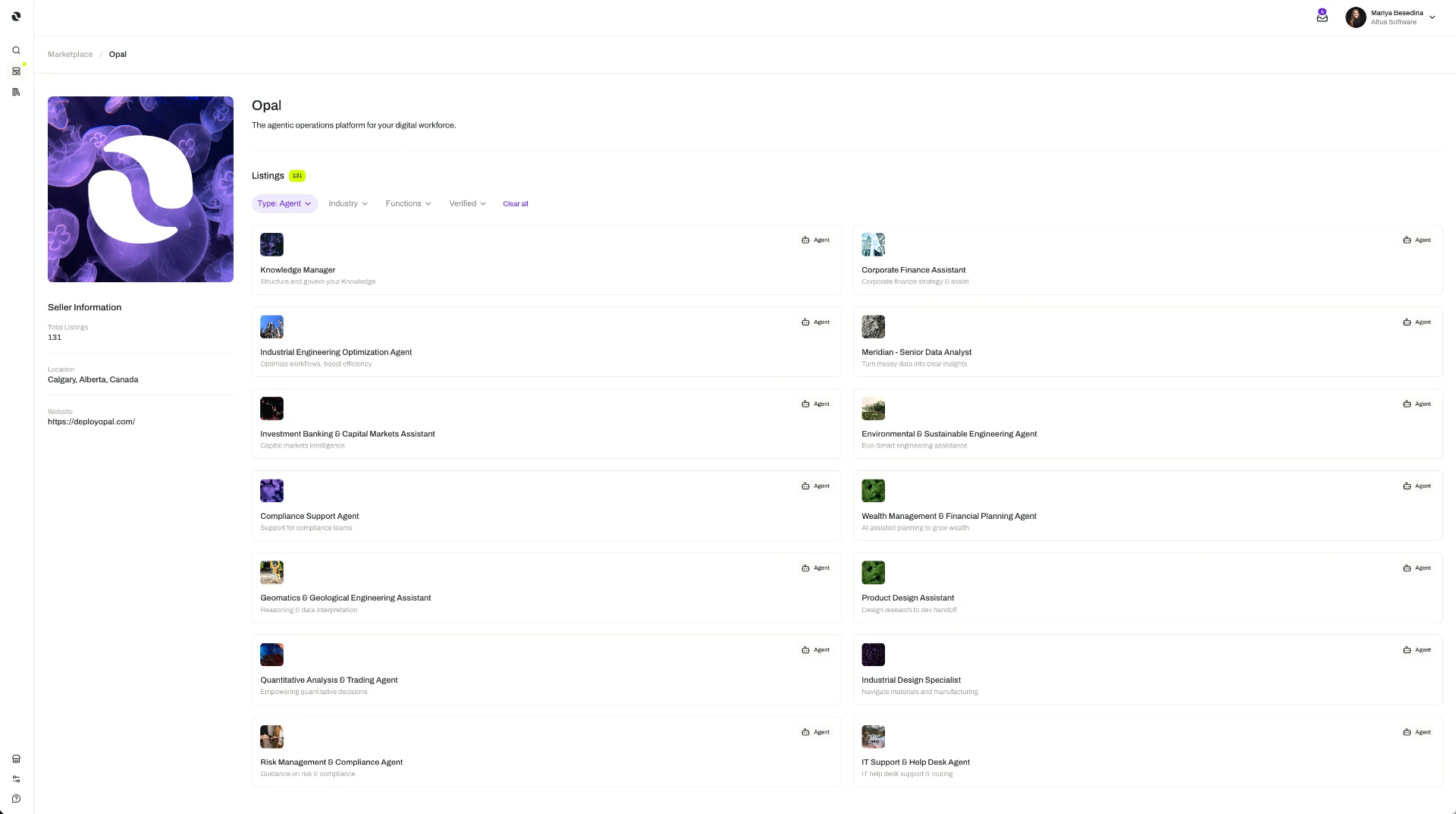
A marketplace profile is your organization's public-facing presence on the Opal Marketplace.
Setting up and managing your organization's marketplace profile is an organization-level action, so it depends on your organization's plan and the role permissions you have been granted. The access model is documented in one place: Access & Permissions.
Overview
A marketplace profile is your organization's public-facing presence on the Opal Marketplace — the identity other organizations see when they come across the resources you have published.
It also has a practical job: it is the first of two setup steps that turn an organization into a seller. Before an organization can sell on the Marketplace, it sets up a public-facing marketplace profile and configures its payout settings. Once both are in place, it can create listings for eligible resources — the templates, MCP Servers, guardrails, skills, tool definitions, and widgets it has already built and proven internally.
That is the value of the profile: it is the small piece of setup that turns work your team has already done into something other organizations can adopt, and turns your expertise into a revenue stream. It is set up once, and everything you publish afterwards sits behind it.
The profile belongs to the organization rather than to any individual member, and it is managed at organization level alongside the organization's listings and payouts.
Your organization also has an organization profile — the name and logo that identify it inside Opal. The marketplace profile is a separate thing, set up for an audience outside your organization. See Profile & Preferences.
If the Marketplace itself is new to you, start with Marketplace, which covers both sides of it: finding and adopting resources built by others, and publishing your own.
Key Capabilities
- Establish a public presence for your organization. The profile is public-facing: it represents your organization to the other organizations browsing the Marketplace, not just to your own members.
- Unlock the ability to sell. Setting up the profile, together with configuring payout settings, is what an organization does before it can create listings.
- Show buyers who they are adopting from. Because the profile is public, an organization considering your resources can see who published them, rather than adopting from an unnamed source.
- Keep it with your other organization settings. The marketplace profile is managed at organization level, alongside the organization's listings and payouts.
How it Works
Selling on the Marketplace follows a fixed order: set up the profile, configure payouts, then publish.
1. Set up the marketplace profile. The organization sets up a public-facing profile that represents it on the Marketplace. This is an organization-level action, managed alongside the organization's listings and payouts.
2. Configure payout settings. Payout settings determine how the organization is paid for what it sells. Buyers are charged in credits and sellers are paid out in US dollars, with the platform handling the conversion. See Payouts.
3. Create listings for eligible resources. With the profile and payout settings in place, the organization can publish resources — setting a price, or making a resource free, based on the resource type and its pricing unit. Listings are created, priced, verified, and taken down individually; the profile stays as it is behind them. See Listings.
The profile is not a one-way announcement — it is the seller-side half of a transaction the platform runs end to end. On the buying side, people browse, search, and filter the Marketplace, and add a resource to their organization directly or request approval from an administrator to do so. When they adopt something you published, your organization earns on the sale.
Additional Notes
- A profile does not publish anything on its own. Setting one up makes your organization able to sell; resources become available to others only when you create listings for them.
- Setup happens once; publishing is ongoing. The profile is part of preparing to sell. Listings come and go after that — each one created, priced, and taken down on its own terms.
- Both setup steps are needed. A profile without payout settings does not make an organization a seller, and neither does payout configuration on its own. Both are completed before the first listing can be created.
- Nothing here changes how buying works. Adopting resources from the Marketplace is a separate path with its own permissions and approval steps; a marketplace profile is only required to sell.
- Short definitions of the terms used here are in one place: Glossary.
Related Features
- Listings — What you publish once your profile and payout settings are in place: individual resources listed for a price or for free, with verification and take-down handled per listing. Listings
- Payouts — The second half of seller setup, and how your organization is paid for what it sells. Payouts
- Marketplace — The wider picture: discovering, publishing, and monetizing shared resources across organizations. Marketplace
- Profile & Preferences — The organization's own profile and preferences inside Opal, which are separate from its public marketplace profile. Profile & Preferences
- Access & Permissions — The full access model behind plans, role permissions, and per-resource permissions. Access & Permissions