
Build a Content Review & Approval Workflow
Build a draft-review-approve process as a flow, so steps run in order with the right people.
Goal
Take a multi-step process that today lives in email, chat, and good intentions — draft, review, approve — and build it as a flow, so the steps happen in order, the right person or agent owns each one, and every pass is reviewed before it counts as done.
A flow is the right home for work whose shape is fixed and whose sequence matters. Unlike a thread, you are not steering live; unlike a task, the work is not a single assignment. It is a defined path from request to result, and you build it once so it can be run the same way every time.
The example used throughout is the monthly customer newsletter. Today it moves between four people by email: someone researches topics, someone drafts, someone edits against the brand standards, and someone signs off. Every month the same questions come back — has anyone seen the draft, who is reviewing it now, which version is the current one. The process is fine. The coordination around it is the waste.
By the end you will have practiced:
- defining a flow's steps in the order the work actually happens
- mixing human and agent assignees in one process, with reviewers where they matter
- attaching the resources each step needs without over-provisioning the rest
- letting an agent pause a step to ask for information with Request Input
- running the flow, following it in the Run Log, and reading the result
- recognizing when a flow should become a template
This guide assumes you already know what flows, tasks, agents, spaces, and knowledge are, and points to those pages rather than repeating them.
Prerequisites
A flow lives in a space, so you need access to the space you are working in, and the permission level you hold there — Manage, Access, or View — sets what you can do in it. Building the flow, adding agents and colleagues to it, and attaching resources all depend on your organization's plan and the role permissions you have been granted; sharing the space and its resources relies on resource sharing and permissions, available on the Business and Enterprise plans. The access model is documented in one place: Access & Permissions.
- The first-time walkthroughs behind you. This guide starts where the Quickstart ends. If you have not yet built an agent, added knowledge, created a space, and run a task or a thread, work through Quickstart first.
- A space for the process, holding what it depends on. A flow works with its space's knowledge and resources by default, so the material the steps need — brand guidelines, past newsletters, audience notes, connectors to the systems involved — belongs in the space before the flow runs. See Spaces.
- The agents who will own steps, already added into that space. Adding an agent into a space is what puts it to work there. Each one should be narrow, because each will be assigned to the specific step it is good at. See Agents.
- The colleagues who will own or review steps, with access to the same space. The permission level you grant each person sets what they can do there.
- A process worth fixing. Several steps, a defined order, more than one kind of contributor, and consequences if it happens in the wrong order or without review. A single recurring assignment does not need a flow — see Automate a Weekly Status Report.
Steps
1. Write down the process as it actually happens.
Before you touch the product, list the stages of the process in order, who owns each one today, and what each one needs in order to do its job. Include the steps that currently happen by accident — the informal check a colleague does, the approval that lives in somebody's inbox — because those are exactly the ones a flow will make explicit.
For the newsletter, the team settles on four stages: research topics, draft the issue, edit against the brand standards, and approve and prepare to send.
2. Make sure the space holds what the process depends on.
Open the space the process lives in and check that the knowledge, connectors, and tools the steps need are in it. Anything added at the space level is available to every agent and every piece of work there, so shared material belongs here. Per-step material comes later, when you attach resources to individual steps.
3. Create the flow and give it a clear name.
Create the flow in the space. Its name will appear in the Run Log every time the process executes, so name it after the outcome — Monthly customer newsletter — rather than the mechanism.
4. Add the steps in order.
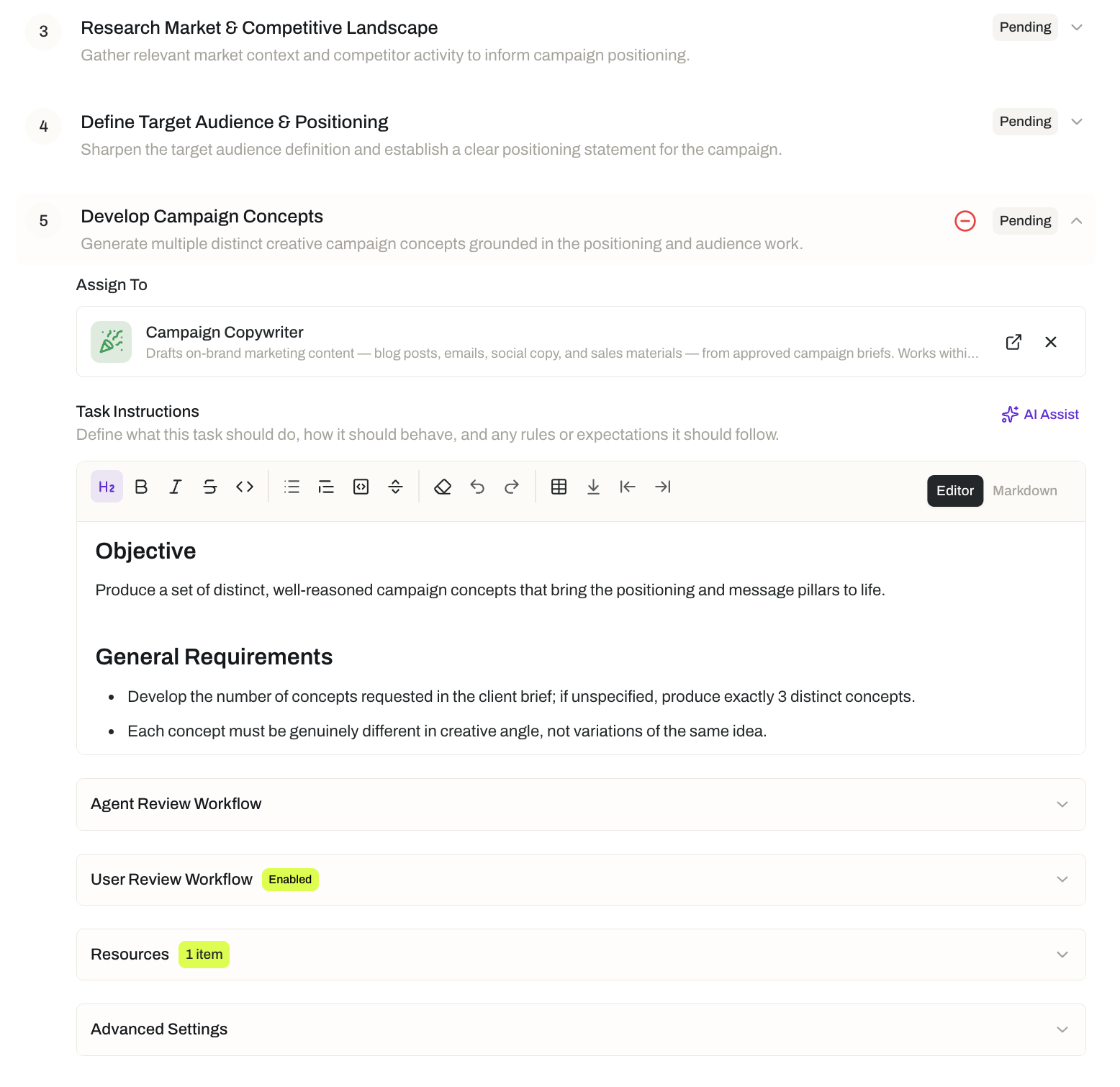
A flow is a sequence of steps that run in order. Add one step per stage from step 1, in the order the work happens. Each step gets its own execution instructions — the brief its assignee follows when the run reaches it — so be specific about what the step should produce and what it should be passed forward.
5. Assign each step to the right agent or user.
Each step is assigned to one agent or one user. This is where a flow differs from both a task and a thread: you can mix humans and agents freely, assigning each step to whoever is genuinely best at it.
For the newsletter:
- Research topics → an agent that can pull from customer feedback, product announcements, and past issues
- Draft the issue → a writing agent briefed on the newsletter's structure and voice
- Edit against the brand standards → an editing agent whose instructions encode those standards
- Approve and prepare to send → the marketing lead, a person, because sign-off should belong to a named human
When a step is assigned to an agent, the agent executes its instructions when the run reaches it, and its response joins the record of the run.
6. Attach what each step needs.
Every step can already use the space's resources and its assignee's own — which covers most of what it requires. When one step needs something the rest of the flow should not have, attach it directly to the step: a specific knowledge folder, a skill, a connector, a tool, or an input or output guardrail.
For the newsletter, the editing step gets the brand standards document and a skill that encodes the editorial checklist. The other steps never see them, which keeps each step's context lean.
7. Put review where the risk is.
Reviewers are optional per step, and each step can have an agent reviewer, a user reviewer, both, or neither — each with its own review instructions. Add them where a wrong output would cost you.
For the newsletter, the draft step gets an agent reviewer instructed to check structure and completeness, and the editing step gets a user reviewer — the senior editor — so a person sees the near-final issue before it reaches approval. The research step runs unreviewed, because its output is checked downstream anyway.
This is the pattern worth remembering: review does not have to be uniform. Spend it on the steps where it earns its keep.
8. Turn on Request Input where a step might get stuck.
With Request Input, an agent executing a step can pause and ask for the information it needs rather than guessing. Turn it on for any step where missing information would otherwise produce a confidently wrong result — the drafting step, for instance, can ask which product announcement should lead the issue instead of inventing a priority.
9. Prove the flow with one real run.
Start a run manually and follow it in the Run Log. Watch each step execute in order, read what each one produces and passes forward, and check that reviewers saw what you expected them to see.
This first run is where you tune. If the draft step comes back with the wrong structure, tighten its execution instructions. If the editing step's reviewer is rubber-stamping, sharpen the review instructions. The whole point of the Run Log is that you can see exactly where the process drifted and fix the step rather than patching the output.
If a run goes wrong partway through, you can reset the flow to an earlier step and re-run from there rather than starting over — useful when the first two steps were fine and only the third needed the fix.
10. Turn on Continuous Learning, and name the template.
Switch on Continuous Learning so lessons from successful runs are captured and later runs benefit. Then — because this process will almost certainly be wanted again — save the flow as a flow template. The template captures the step sequence, the assignments, the reviewers, and the attached resources, so the next time someone needs a review-and-approval process they start from this one instead of from scratch.
11. Read what you get back, not just that it ran.
Each run's result is the accumulated output of its steps — in the example, a newsletter that has been researched, drafted, edited, and approved. Read a few early results closely. Once the outputs consistently match what the team would have produced by hand, the process has earned its trust, and your involvement settles into reviewing rather than coordinating.
Result
You have turned a loosely coordinated process into a flow that runs the same way every time. Specifically:
- One defined path, not four inboxes. Research, draft, edit, and approve happen in order, in one place, with no version confusion about which draft is current.
- The right contributor on every step. Agents own the steps that benefit from speed and consistency; people own the steps that need judgment and accountability. Neither is asked to do the other's job.
- Review where it matters. Steps that carry risk get a reviewer with instructions; steps that do not, run clean. Oversight is spent deliberately.
- No guessing. Request Input lets an agent pause and ask rather than invent, so gaps in information surface as questions instead of errors.
- Every run accounted for. The Run Log records each execution, so the process is auditable end to end — and recoverable mid-run when a single step needs another pass.
- Better each time. Continuous Learning carries lessons forward, and saving the flow as a template means the next team inherits the whole working setup.
This is how a process stops depending on people remembering to chase it: the path is defined, the owners are assigned, and the coordination that used to consume the team's attention simply happens.
Related Guides
- Flows — The full picture of steps, assignees, reviewers, resources, Request Input, dynamic steps, resetting and re-running, and the Run Log. Flows
- Tasks — When a single assignment — rather than a sequence — is the right shape for the work. Tasks
- Agents — How an agent is configured and specialized, and everything it can be assigned to execute or review. Agents
- Spaces — What a space holds, how space-level resources are shared, and how its permission levels work. Spaces
- Collaborate on a Project in a Shared Thread — Directing several people and agents live, for work whose shape is still forming. Collaborate on a Project in a Shared Thread
- Automate a Weekly Status Report — Giving a single piece of recurring work to an agent as a task. Automate a Weekly Status Report