
Spaces
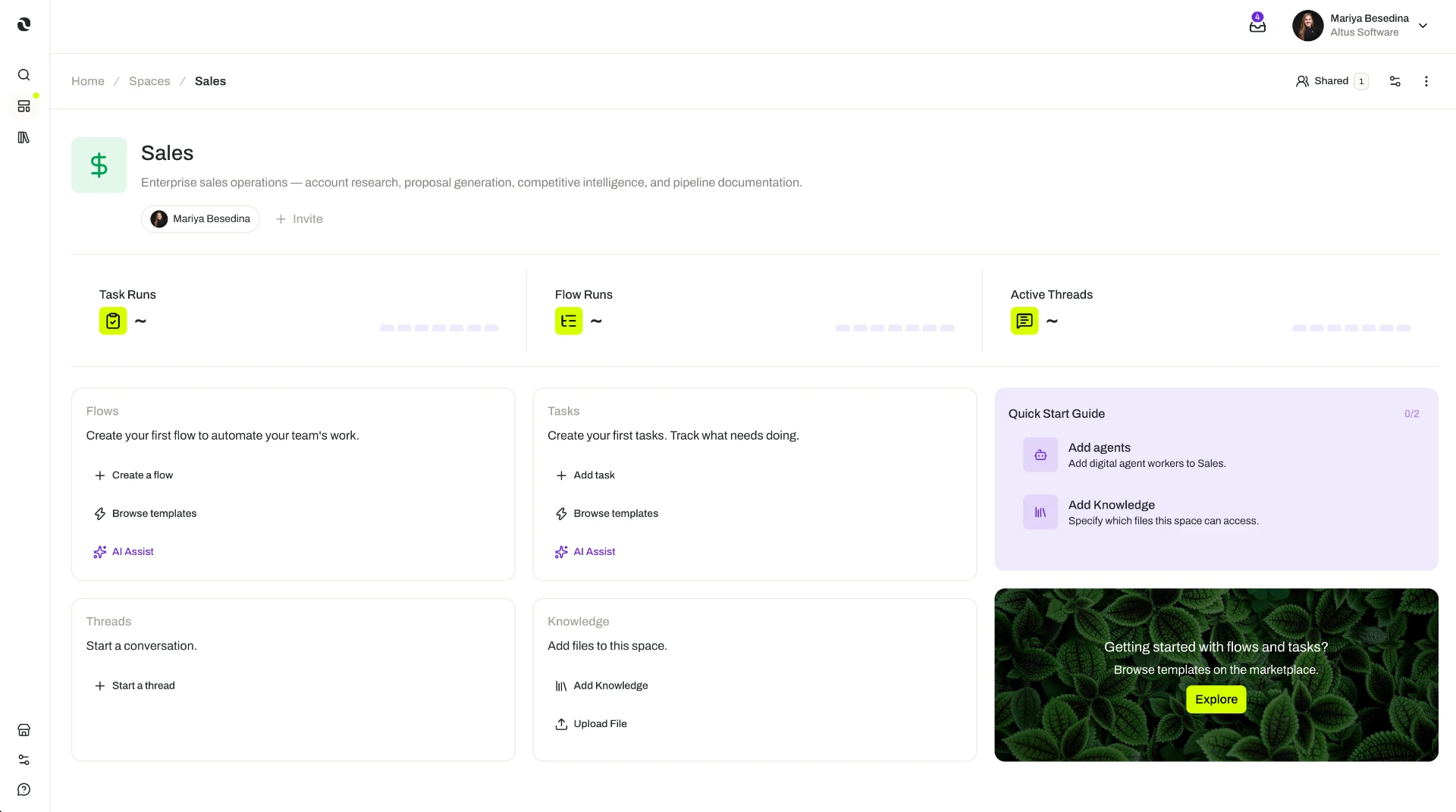
A space is an operational environment where people and agents come together to do work — agents, knowledge, capabilities, and work in one organized context.
Creating a space depends on your organization's plan and the role permissions you have been granted. What you can do inside a particular space depends on the permission level you hold there — Manage, Access, or View — and sharing a space with other people relies on resource sharing and permissions, available on the Business and Enterprise plans. The access model is documented in one place: Access & Permissions.
Overview
A space is an operational environment in Opal where people and agents come together to do work. It brings the agents, knowledge, capabilities, and work of one team, project, or initiative into a single organized context.
Think of a space as the answer to the question where does this work live? Rather than keeping the people in one tool, the reference material in another, and the automation somewhere else again, a space keeps them together — so nobody has to reassemble the same context every time work starts.
A space holds five things:
- People — the colleagues invited to take part, each at a permission level suited to their role.
- Agents — the digital workers added into the space to do the work.
- Knowledge — the files and folders that people and agents work from.
- Capabilities — the skills, connectors, tools, widgets, and guardrails available to the space.
- Work — the threads, tasks, and flows created and run there.
One idea does most of the work on this page: anything added to a space is available to everything in it. Add a connector at the space level and every agent in the space can use it. Add a guardrail and it applies to the work carried out there. That is what makes a space more than a folder — it is the shared operating context that the work inherits.
A space can be organized around whatever reflects how your team actually works: a department, a project, an initiative, a customer, or a product.
Key Capabilities
- Bring work into one context. Keep agents, knowledge, capabilities, and work together in a single shared operational environment.
- Put agents to work. Add agents into the space, where they collaborate in threads and are assigned to execute or review tasks and flow steps.
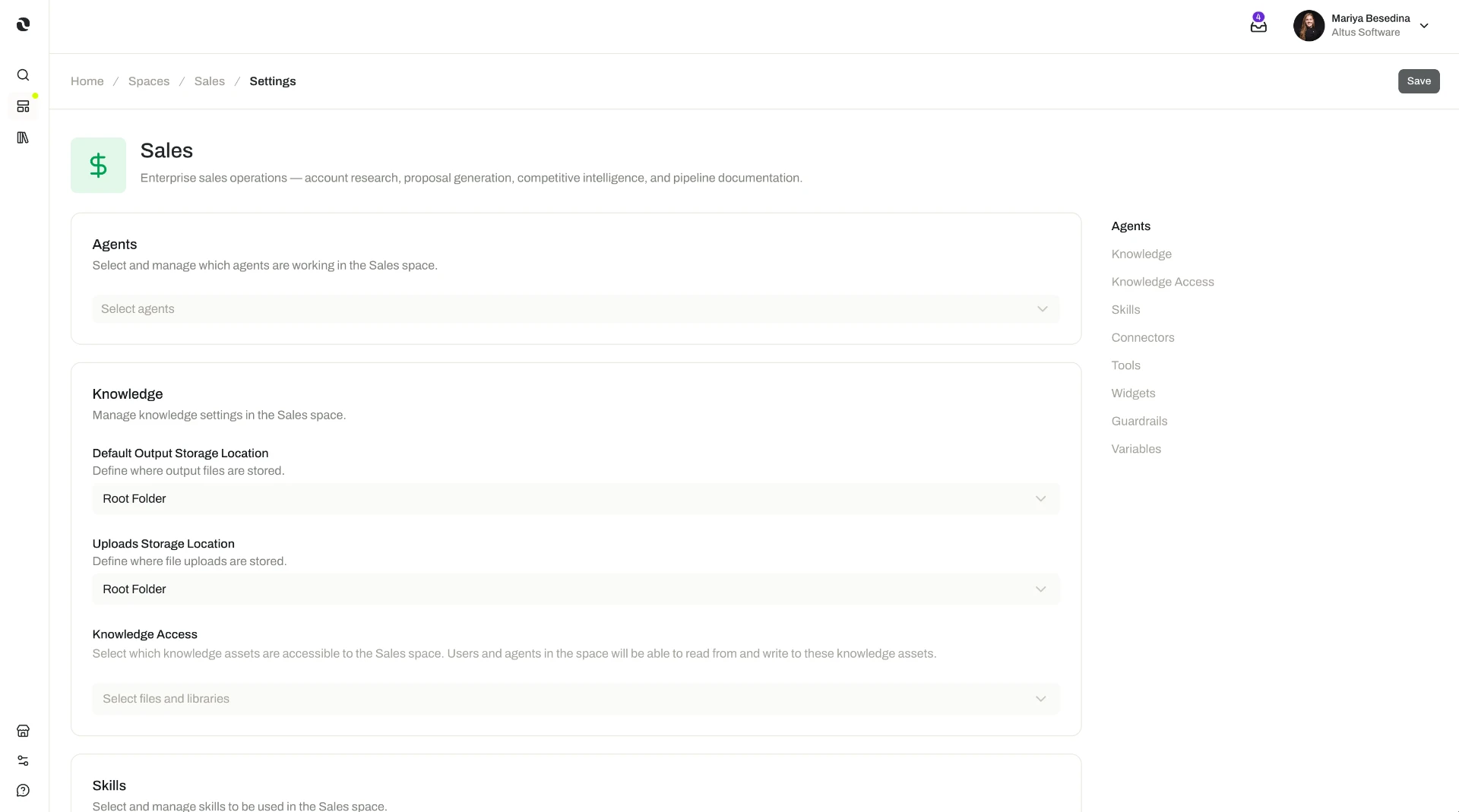
- Add capabilities at the space level. Add skills, connectors, tools, widgets, and guardrails to the space so they are available to everything in it.
- Ground the work in shared knowledge. Add knowledge so people and agents draw on the same information.
- Run the work in place. Create and run threads, tasks, and flows within the space.
- Control who takes part. Invite people and grant each one of three permission levels — Manage, Access, or View.
Each of these capabilities is configured in one place: Space Settings. From a space's Settings page you select the agents working in it, manage its knowledge and storage, and add the skills, connectors, tools, widgets, and guardrails the space relies on — so the whole space inherits the same shared configuration.
How it Works
Start with the scope. Create the space around one thing: a department, project, initiative, customer, or product. A space works best when its scope matches a real unit of work, because everything you add next — agents, knowledge, capabilities, people — is scoped to it too.
Add the agents that will do the work. Adding an agent into a space is what puts it to work. From there it can collaborate in the space's threads and be assigned to execute or review its tasks and flow steps.
Add capabilities once, for the whole space. Alongside the agents, you add the skills, connectors, tools, widgets, and guardrails the team relies on. Adding them to the space — rather than only to an individual agent — makes them available across the whole space: any agent working there can use them, and they carry through the threads, tasks, and flows run there. A capability, integration, or safeguard is set up once at the space level instead of being repeated on every agent.
Add the knowledge the work depends on. Files and folders added to the space give people and agents the same material to work from. Agents operating in the space can retrieve and use that content while working, and can create or edit documents as part of their work.
Invite people at the right permission level. Each person you invite is granted one of three levels:
- Manage — view, edit, and use the space, and manage its settings and sharing.
- Access — view, edit, and use the space.
- View — see the space's details.
Do the work inside the space. With the pieces in place, people and agents collaborate in threads, run tasks, and execute flows — all drawing on the same agents, capabilities, and knowledge.
Additional Notes
- Space capabilities and agent capabilities work together. An agent brings its own configuration into the space, and the space adds what it holds. When an agent responds in a thread, it draws on the space's knowledge as well as its own skills, connectors, tools, widgets, and guardrails.
- Consistency comes for free. Because agents, guardrails, and knowledge are attached to the space, work carried out there behaves consistently and stays grounded in the same information — whether it happens live in a thread or unattended in a task.
- Permission levels are granted space by space. You choose someone's level when you invite them into a space, so involvement can be sized to the person and to that particular piece of work — from full control over settings and sharing down to view-only visibility. This is what makes it practical to keep sensitive work in its own space.
- Let the structure follow the team. Because a space can be built around a department, project, initiative, customer, or product, its structure can mirror how the organization is actually set up rather than forcing a new one.
Related Features
- Threads — Conversations between people and agents, created inside a space, where they work together in real time. Threads
- Tasks — Units of work assigned to an agent to run on their own, carrying their own instructions and their own trigger. Tasks
- Flows — Multi-step workflows that carry a process from start to finish, each step with an assignee and optional review. Flows
- Agents — The digital workers added into a space, where they collaborate in threads and execute or review tasks and flow steps. Agents
- Knowledge Overview — Opal's centralized knowledge base; files and folders are added to a space so people and agents work from the same information. Knowledge Overview
- Access & Permissions — The full access model behind plans, role permissions, and the permission levels granted in a space. Access & Permissions