
Agents
An agent is a digital worker in Opal: it takes part in conversations, completes and reviews tasks and flow steps, and works from your organization's knowledge.
Creating and configuring agents depends on your organization's plan and the role permissions you have been granted, and what you can do with a particular agent depends on the permissions set on that agent and on the resources it uses. Sharing an agent with other people relies on resource sharing and permissions, available on the Business and Enterprise plans. The access model is documented in one place: Access & Permissions.
Overview
An agent is a digital worker in Opal. Agents work alongside people rather than in a separate lane: they take part in conversations, complete and review tasks, execute and review steps in a workflow, draw on organizational knowledge, and act in the systems your team already uses.
The difference between an agent and a language model you chat with is preparation. A model starts every conversation from nothing and has to be briefed again each time. An agent packages that briefing permanently — a prompt that defines its role, the model that powers its reasoning, the capabilities it can call on, and the safeguards it operates within — so it applies the right context and behaves consistently every time, without anyone re-explaining the job.
That is what makes specialization practical. Rather than one general-purpose assistant asked to do everything, you build a handful of purpose-built workers: an agent that assesses account health, another that reviews written output against a standard, another that keeps a system of record up to date. Because each one is specialized, several can work on the same effort at once, each contributing its own expertise — including the pattern of one agent doing the work and another checking it before it is accepted.
This page is about the agent itself: what it is, how you assemble one, and how you put it to work. Each building block it is assembled from — models, skills, connectors, tools, widgets, guardrails — has its own page in this subsection, and those pages go deeper than this one does.
Key Capabilities
- Collaborate in conversations. Take part in a thread alongside people and other agents, answering questions and contributing to the work as it happens.
- Execute and review tasks. Carry out an assigned task, or act as the reviewer of another assignee's output before it is accepted.
- Execute and review flow steps. Perform a step within a multi-step flow, or review a step someone — or something — else performed.
- Work from organizational knowledge. Retrieve and apply the content in its space, so its work reflects your information rather than a generic answer.
- Act in external systems. Use connectors and tools to fetch live data and take action, so work is completed rather than merely recommended.
- Specialize through capabilities. Apply a defined set of skills, connectors, tools, and widgets so the agent is genuinely good at a specific set of responsibilities.
- Operate within guardrails. Check what goes in and what comes out against the safeguards attached to it, and handle flagged content by redacting, masking, hashing, or blocking it.
- Work as part of a team of agents. Combine several specialized agents on one effort, including an executor–reviewer pairing that adds a layer of checking without a person reviewing every result.
How it Works
Building an agent is a short sequence: describe the job, choose the intelligence, add the capabilities, set the boundaries, then put it into a space where work happens.
1. Write the prompt that defines its role. Every agent starts with a prompt — the instructions that describe what the agent is for and how it should behave. This is the closest equivalent to briefing a new colleague, and it is worth the same care: the clearer the role and the expectations, the more consistent the agent's work.
2. Choose the model that powers its reasoning. You can select a model directly and set its parameter values, or select a pre-defined model config — a saved preset that pairs a model with a defined set of parameters. Model configs exist so that whoever knows the models best can make that choice once, and everyone else can build on it without learning what each parameter does. You can also start the other way round, creating an agent directly from a model or a model config in the catalog. See Models.
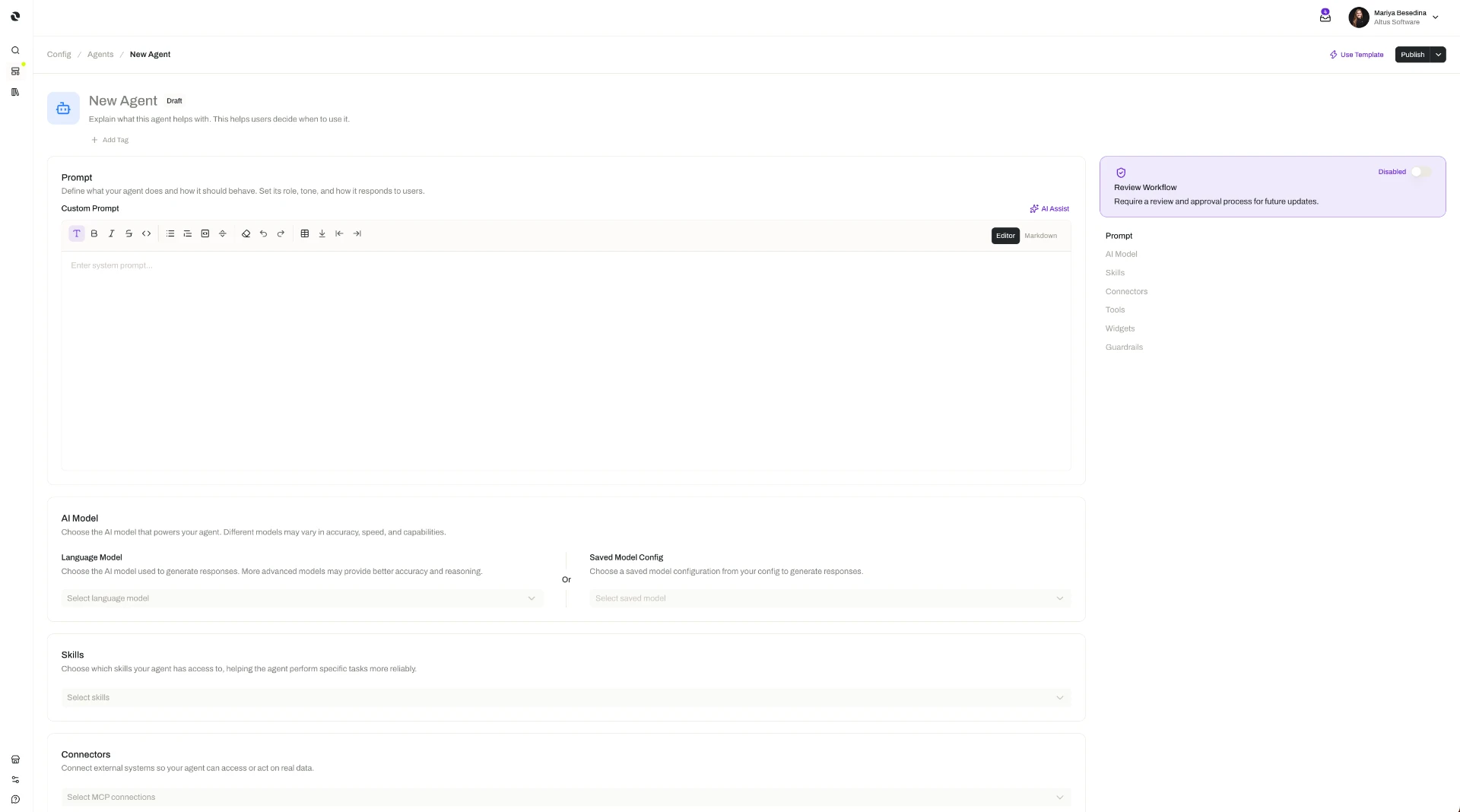
3. Equip it with the capabilities its work calls for. Each capability plays a different role:
- Skills — reusable, packaged expertise that tells the agent how to perform a particular kind of work, along with its supporting templates and examples. Skills
- Connectors — MCP Connections that link the agent to an external system, carrying the permissions of the person the connection belongs to. Connectors
- Tools — individual callable actions, such as an HTTP call to a service that has no connector. Tools
- Widgets — interactive interface elements the agent can embed in a thread message, turning a response into something a person can fill in or click. Widgets
The agent decides when each of these is relevant and reaches for it as the work requires — you are equipping it, not scripting it.
4. Attach guardrails. A guardrail can be attached as an input guardrail, checking what reaches the agent, as an output guardrail, checking what the agent returns, or as both. For each one, you choose how flagged content is handled — redact it, mask it, hash it, or block the input or output entirely with a message of your choosing. There is no limit on how many guardrails a single agent carries. See Guardrails.
5. Add the agent into a space. This is the step that puts the agent to work. A space is the operational environment where a team's people, agents, knowledge, capabilities, and work live together — and once an agent is in one, it can collaborate in that space's threads, be assigned to execute or review its tasks, and be assigned to execute or review steps in its flows. The space also supplies context: the knowledge added there becomes the material the agent works from, and any skills, connectors, tools, widgets, and guardrails added at the space level are available to it on top of its own. See Spaces.
6. Give it work, and stay in the loop. In a thread, people direct an agent in natural language, the same way they would ask a colleague. In a task or a flow step, the agent works from the instructions provided for that assignment — execution instructions when it is assigned to carry out the work, review instructions when it is assigned to review someone else's. Output is never out of your hands: you can review and refine what an agent produces at any point.
Additional Notes
- Start from a template when a proven setup already exists. An agent template is a reusable, pre-configured starting point that carries a consistent prompt, model, and capabilities, so a good agent can be reproduced rather than rebuilt. See Agent Templates.
- Knowledge reaches an agent through its space, not through the agent. There is no per-agent knowledge setting to maintain: add files and folders to the space, and the agents working there retrieve what they need while they work — and can create and edit documents as part of it. See Knowledge for Agents.
- Agent configuration and space configuration add up. An agent brings its own capabilities into a space and the space adds what it holds, so a capability every agent needs is best added once at the space level rather than repeated on each agent.
- Specialize rather than generalize. A narrow, well-briefed agent tends to outperform a broad one, and specialized agents combine well — which is what makes the executor–reviewer pattern, and multi-agent flows, worth reaching for.
- Reviewing is a first-class assignment. An agent can be the reviewer of a task or a flow step just as readily as the executor, and it follows its own review instructions when it is. That is how quality checking scales without a person inspecting every result.
- Changing a shared building block affects the agents that use it. A model, for instance, lists its linked resources — the model configs, agents, and agent templates that depend on it — so the impact of a change can be understood before it is made.
- Short definitions of the terms used here are in one place: Glossary.
Related Features
- Models — The intelligence behind an agent, chosen directly with its parameters or as a saved model config. Models
- Skills — Reusable packaged expertise that shapes how an agent performs a specific kind of work. Skills
- Connectors — Secure links to external systems, built on MCP, that let an agent retrieve data and act. Connectors
- Tools — Individual callable actions an agent can invoke, including services that have no connector. Tools
- Widgets — Interactive interface elements an agent can present within a thread. Widgets
- Guardrails — Input and output safeguards that check an agent's content and decide how flagged material is handled. Guardrails
- Agent Templates — Reusable, pre-configured starting points for creating agents with a consistent prompt, model, and capabilities. Agent Templates
- Knowledge for Agents — How the content in a space becomes the grounding context an agent works from. Knowledge for Agents
- Spaces — The operational environment an agent is added into, and where its threads, tasks, and flows live. Spaces
- Threads — Real-time conversations where people and agents work together. Threads
- Tasks — Work an agent runs on its own, as executor or as reviewer, following the task's instructions. Tasks
- Flows — Multi-step processes whose steps agents execute and review alongside people. Flows
- Access & Permissions — The full access model behind plans, role permissions, and per-resource permissions. Access & Permissions