
Tools
A tool is a single, callable action an agent can take — a request sent to an external service — so the agent can get work done rather than only talk about it.
Creating a tool definition, creating a tool from it, and attaching that tool to agents, spaces, tasks, and flows depends on your organization's plan, the role permissions you have been granted, and the permissions set on the individual tool. Sharing a tool with other people relies on resource sharing and permissions, available on the Business and Enterprise plans. The access model is documented in one place: Access & Permissions.
Overview
A tool is a single, callable action an agent can take — a request sent to an external service — so the agent can get work done rather than only talk about it.
Agents are good at reasoning, but plenty of work needs an actual action performed: look up a stock level, submit a value to an internal system, retrieve a figure from a system of record. Where that action lives behind a service your organization already runs, a tool gives the agent a direct way to call it. The agent decides when the action is relevant, calls the tool with the information it needs, and uses the result to carry on with the work.
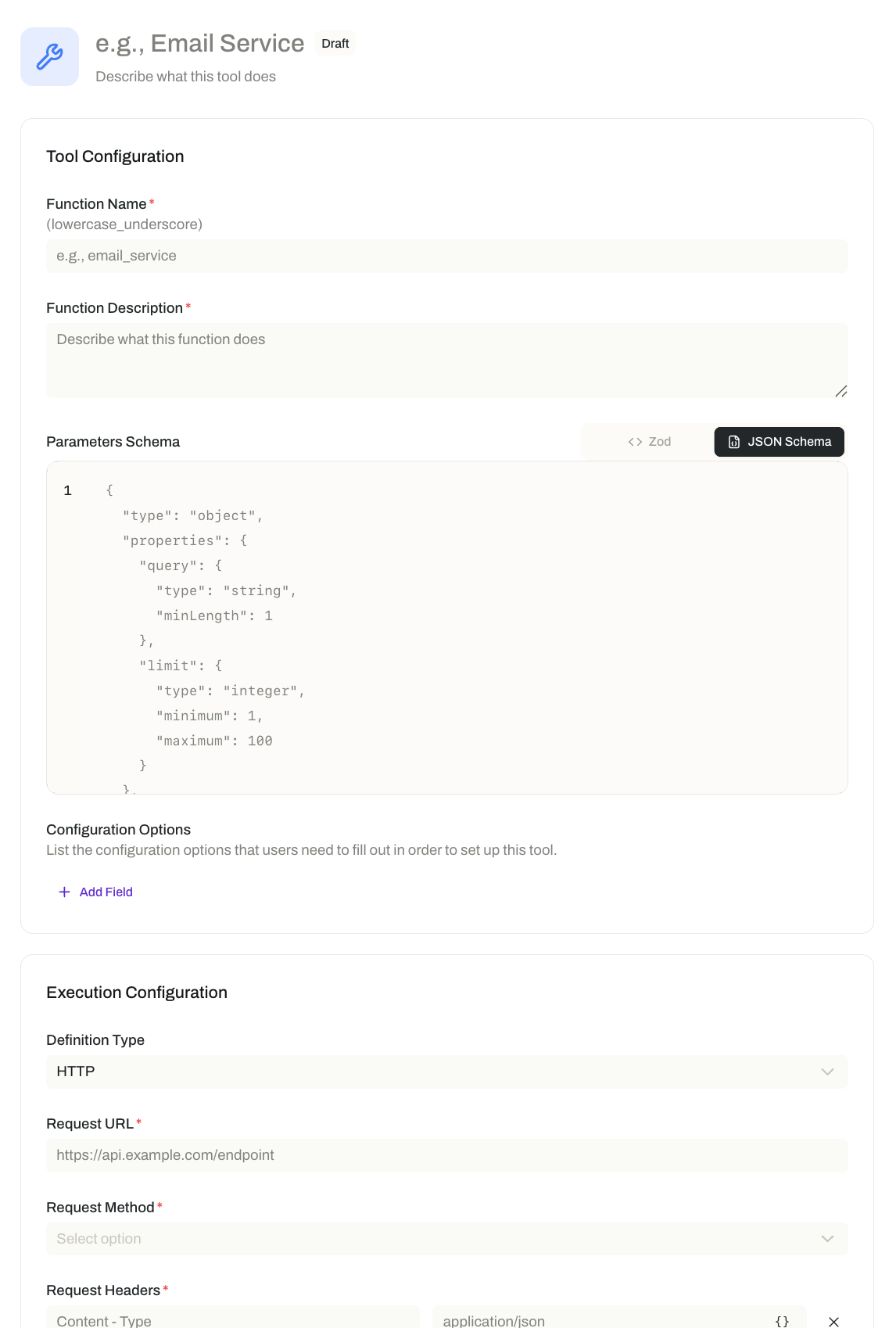
Every tool starts with a tool definition — a reusable blueprint that describes a single action. The definition holds the function's name, a description of what it does, and the parameters the action needs to run. You create the definition once; you can then create many tools from it, each set up for its own context.
Tools and connectors both reach outside Opal, but they solve different problems. A connector is a system-level integration built on the Model Context Protocol (MCP): it links Opal to an external service that supports MCP, exposes that service's functionality, and carries each person's own permissions there. A tool is narrower and more direct: one specific action, called over HTTP against an endpoint you provide. Where a system offers an MCP-based integration, a connector is usually the better choice. Reach for a tool when there is no MCP integration to use, or when the job is a single, well-defined operation. See Connectors.
Key Capabilities
- Give agents individual, callable actions. Equip an agent with specific actions it can invoke whenever the work requires them.
- Reach services that no connector covers. Call an external service directly over HTTP, rather than waiting for a dedicated integration to exist.
- Define an action once and reuse it. A tool definition specifies the function's name, description, and parameters, and any number of tools can be created from it.
- Configure each tool for its own context. A definition can present configuration fields when a tool is created from it, so the same underlying action can be set up differently for different needs.
- Put actions where the work happens. Attach tools to agents, spaces, tasks, and flows — and attach tool definitions to agent, task, and flow templates.
How it Works
1. Create the tool definition. Start with the blueprint for the action: its function name, a description of what it does, and its parameters — the pieces of information the agent supplies each time it calls the tool, such as a product ID or a date range. The description matters more than it looks: it is what tells an agent when this action is the right one to call.
2. Specify how the action is carried out. A tool carries out its action as an HTTP call: it calls an external service using a URL, an HTTP method such as GET or POST, and any headers the service requires. Header values can use variables, so a header does not have to be hard-coded into the definition.
- Function name
- Description of what it does
- Parameters the model supplies
- Request URL
- Method
- Headers and configuration fields
3. Add configuration fields for the values that vary. A definition can include optional configuration fields, which are shown to whoever creates a tool from it. Use them for values that stay the same every time the tool runs but differ from one tool to the next — the base URL of a particular team's environment, an account or workspace ID, or an API key. This is what makes one definition reusable across several tools: the action is identical, the settings are not.
4. Create a tool from the definition. Creating the tool means filling in those configuration fields for this particular use. The result is a concrete, ready-to-call action.
5. Attach the tool where the work happens. A tool has no effect until it is attached. You can attach it to:
- An agent — the action becomes part of what that agent can do, alongside its skills, connectors, and widgets. See Agents.
- A space — making the action available within that operational context.
- A task or a flow — so unattended and multi-step work can take the actions those processes depend on. See Tasks and Flows.
6. Put definitions on templates so new work starts equipped. Tool definitions can be attached to agent templates, task templates, and flow templates, so new agents, tasks, and flows created from them start with the actions they need.
7. Let the agent call it when the work calls for it. Once the tool is attached, the agent invokes it at its own judgment — passing in the required parameters and using what comes back to continue its work.
Additional Notes
- A tool calls an existing endpoint; it does not create one. You are responsible for developing and hosting the endpoint the tool calls, which takes software development expertise. Plan for that before committing to a tool — it is the part of the work Opal does not do for you.
- Every tool is an HTTP call. A tool definition carries out its action by calling an external service over HTTP.
- Tool or connector? If the system supports MCP, start with a connector: it exposes that system's functionality and respects each person's own permissions there. Choose a tool for a direct call to a service that has no MCP integration. The two are complementary, and an agent can carry both. See Connectors.
- Tools do; skills decide how. A skill shapes the method an agent follows, while a tool extends what it can actually reach and act on. Work that must both follow your standard and update a live system needs both. See Skills.
- Write the description as if for a new colleague. An agent chooses a tool based on what the definition says the action does. A vague description leads to a tool that gets called at the wrong moment, or not at all.
- Attach broadly used tools at the space level. Where a whole team's work depends on the same action, attaching it once to the space saves repeating the attachment on every agent.
- Tools take real action, so pair them with the right safeguards. Guardrails control what goes into an agent and what comes out of it, which matters more once an agent can act on live systems rather than only answer. See Guardrails.
- Short definitions of the terms used here are in one place: Glossary.
Related Features
- Connectors — MCP-based integrations with external systems; the system-level counterpart to a tool's single action. Connectors
- Agents — The digital workers that call tools, deciding when an action is relevant to the work at hand. Agents
- Skills — Packaged expertise that shapes how an agent works, where tools extend what it can do. Skills
- Widgets — Interactive interface elements an agent can present in a thread; tools act on systems, widgets shape the exchange with people. Widgets
- Guardrails — Safeguards on what goes into an agent and what comes out of it. Guardrails
- Spaces — The operational environment a tool can be attached to, making its action available to the work done there. Spaces
- Tasks — Work an agent runs on its own; attaching a tool lets each run take the actions it depends on. Tasks
- Flows — Multi-step processes whose steps can call tools as they run. Flows
- Agent Templates — Reusable agent setups that can carry tool definitions, so new agents start with the actions they need. Agent Templates
- Task Templates — Reusable task setups that can carry tool definitions, so tasks created from them arrive equipped. Task Templates
- Flow Templates — Reusable flow setups that can carry tool definitions, so flows created from them arrive equipped. Flow Templates
- Access & Permissions — The full access model behind plans, role permissions, and per-resource permissions. Access & Permissions