
Task Templates
Reusable blueprints for tasks — package instructions, a default agent, reviewers, and resources once, then create consistent tasks from them.
Creating, editing, and using task templates depends on your organization's plan and the role permissions you have been granted, as well as the permissions set on the template itself and on each agent or resource it references. Where you do not have access to a default agent or an attached resource, you see the note the template's author wrote for it instead. The access model is documented in one place: Access & Permissions.
Overview
A task template is a reusable blueprint for creating tasks. It captures a pre-configured task — the instructions describing the work, the agent assigned to run it, any reviewers, a recommended trigger, and any attached resources — so a new task starts from a ready-made setup instead of being built from scratch each time.
The value shows up the moment the same unit of work has to be set up again: for the next client account, the next region, the next campaign. Someone who knows how the work should be done packages it once. From then on, whoever needs that work running fills in a few details rather than deciding again which agent should do it, who should check it, how it should be triggered, and what it needs access to.
A template holds the same elements as a task, which means a task setup that already works well can be captured as a template and reused across the organization. And every task created from a template stays linked to it — so when the approach improves, each task can be brought up to date on its owner's schedule rather than rebuilt.
If tasks themselves are new to you, read Tasks first: this page assumes you know what task instructions, reviewers, and triggers are.
Key Capabilities
- Package a whole task configuration. Capture the task instructions, the assigned agent, reviewers, a recommended trigger, and attached resources — knowledge, skills, connectors, tools, and guardrails — as a single reusable blueprint.
- Guide people with placeholders. Write the task instructions and the agent reviewer instructions as templated fields, using
{{ placeholders }}for the parts that change from one task to the next, so the person creating the task knows exactly what to supply. - Keep human-reviewer instructions readable. User reviewer instructions are standard text that is always readable, so a person asked to review the work can always see the full instructions they are expected to follow.
- Protect sensitive detail. Protect the task instructions and the agent reviewer instructions when you would rather not expose those details to everyone who uses the template.
- Name a default agent. Select a default agent for the assignee or the reviewer role, with an optional fallback note for anyone who does not have access to that agent.
- Ask for a person without naming one. User assignment is a simple toggle rather than a named individual, so the template does not fix who that person will be.
- Recommend how the work should run. Specify recommended trigger types — manual, recurring, schedule, or webhook — to guide how tasks created from the template should be run.
- Say what to do when access is missing. Add a fallback note to any attached resource — knowledge, skills, connectors, tools, and guardrails — shown to anyone who lacks access to the underlying resource.
- Update on the owner's terms. Each task stays linked to the template it came from, so its owner can choose to sync it with the template's latest updates when they are ready.
How it Works
A template is built once by an author, used many times by whoever creates tasks, and stays connected to those tasks afterwards.
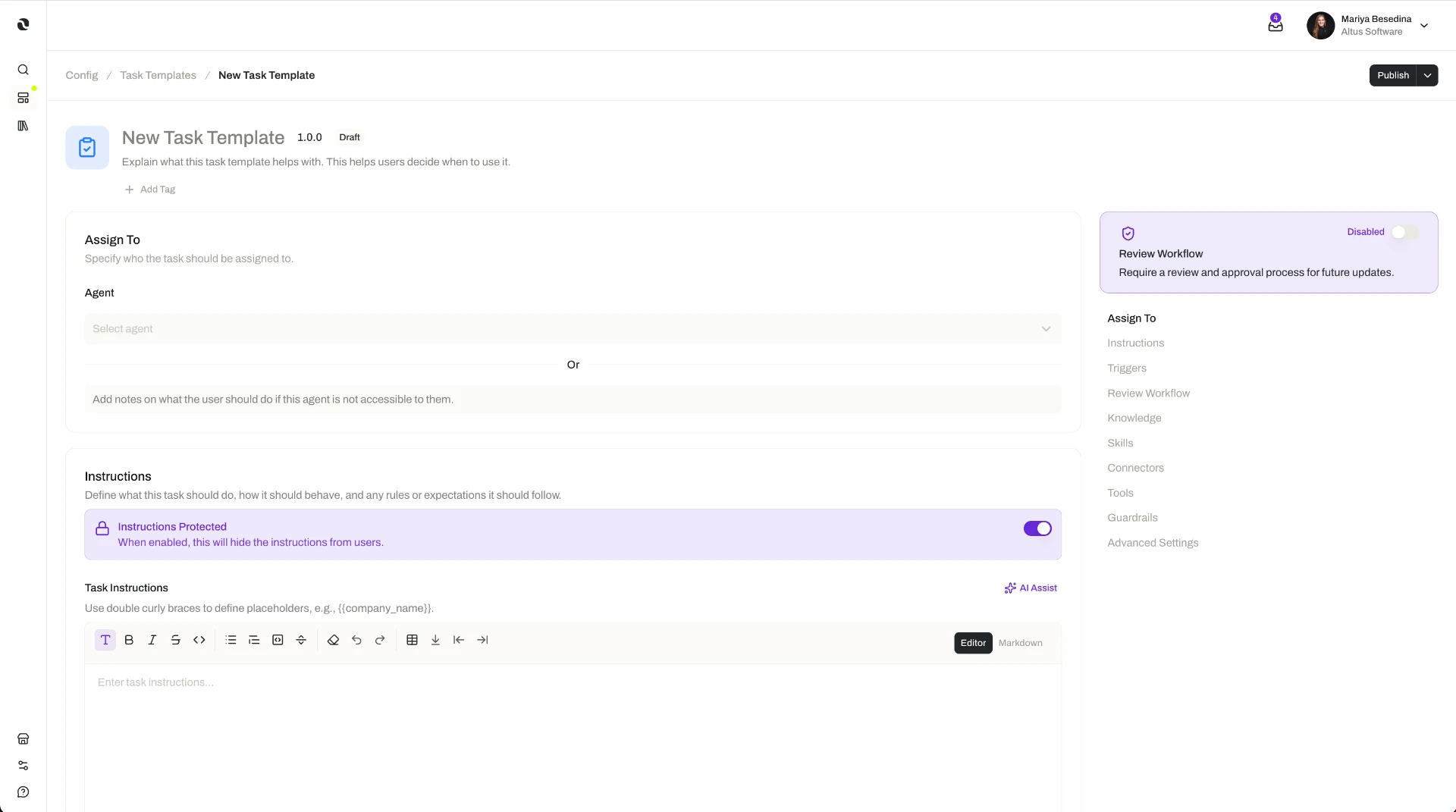
1. An author defines the template. A task template is built from the same elements that make up a task: the instructions describing the work, the agent assigned to run it, any reviewers, a recommended trigger, and any attached resources.
- The instructions, with placeholders for what varies. Two fields can be written as templated fields using
{{ placeholders }}: the task instructions and the agent reviewer instructions. Placeholders mark the parts that should change from one task to the next — an account name, a data source, a reporting period — and the person creating the task fills them in. Everything outside the placeholders stays the same in every task created from the template, which is what makes the results consistent. - User reviewer instructions, always in plain sight. Instructions for a human reviewer work differently: they are not templated and cannot be protected, because a person being asked to review something needs to read the full instructions for the review they are performing.
- Who does the work, and who checks it. The author can select a default agent for the assignee or reviewer role, and add a fallback note that appears if someone does not have access to that agent. Where a person should be involved, user assignment is set with a simple toggle rather than by naming a specific individual. See Agents.
- A recommended trigger. The template can specify recommended trigger types — manual, recurring, schedule, or webhook — to guide how the task should run.
- The resources the work calls for. Knowledge, skills, connectors, tools, and guardrails can be attached to the template, so tasks created from it start with the same context, capabilities, integrations, and controls. Each attached resource can carry its own fallback note for anyone who lacks access to it. See Knowledge Overview, Skills, Connectors, Tools, and Guardrails.
- Protection for anything that should stay private. Either templated field — the task instructions or the agent reviewer instructions — can be protected so its full contents stay hidden, while the template remains usable by everyone else.
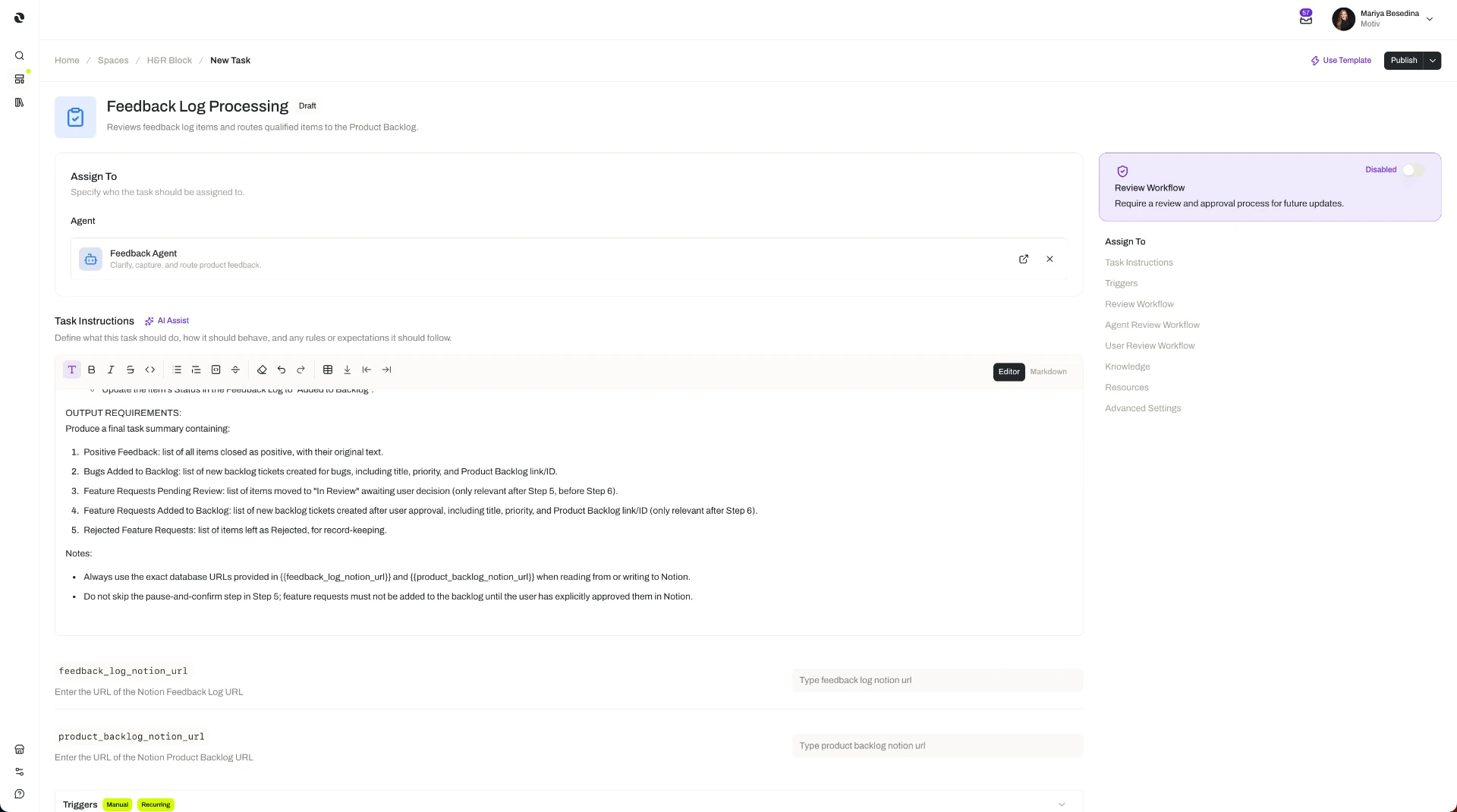
2. Someone creates a task from the template. When creating a task, a person can choose to start from a template instead of from scratch. The template pre-fills the task's instructions, assignments, trigger, and resources; the person fills in any placeholders and adjusts the task as needed before running it.
- Fill in the placeholders. The placeholders in the task instructions and the agent reviewer instructions mark what needs to be supplied for this particular task.
- Read what you need to act on. If a templated field is protected, its contents stay hidden — but the instructions for a human reviewer are always readable.
- Check what is missing. Where the creator does not have access to the default agent or an attached resource, the author's fallback note explains what to do or request instead.
3. Each task stays linked to its template. When a template is updated, the tasks created from it do not change automatically. Instead, each task can be synced with the template's latest updates when its owner is ready — so an improved approach spreads without a running task shifting underneath the people relying on it.
Additional Notes
- The trigger is a recommendation. A template specifies recommended trigger types to guide how the work should run; the task itself is still adjusted before it runs.
- Tasks created from a template run in a space. The space provides the operational context, ownership, and access control around the task. See Spaces.
- Protecting the instructions is what makes wide sharing comfortable. An author can distribute a template for reuse without exposing sensitive detail in the task or agent reviewer instructions — while the human reviewer's instructions stay readable, so nobody is asked to approve work they cannot see the brief for.
- Fallback notes prevent a dead end. Someone who cannot see a default agent or an attached resource gets the author's explanation at the moment they need it, instead of an unexplained gap in the setup.
- Templates are governed like other resources. Task templates carry the platform's standard governance controls: version control, permissions, a publishing workflow, and an activity log. See Access & Permissions.
- The same idea applies to agents and flows. See Agent Templates and Flow Templates.
- Short definitions of the terms used here are in one place: Glossary.
{{ account_name }} and {{ data_source }}, an analyst agent as the default assignee with a fallback note, the user reviewer toggle turned on with clear, always-readable instructions for the human approver, and a recommended recurring trigger so the check runs on a weekly cadence. When a new account comes on board, a team member creates a task from the template, fills in the placeholders for that account, and runs it — a consistent check every time, without rebuilding the setup. Each task stays linked to the template, so when she refines the check and updates the template, each account's task is synced to the latest version on its own schedule.Related Features
- Tasks — What a task is and how one is set up; a task created from a template inherits the template's instructions, assignments, reviewers, recommended trigger, and resources, stays linked to it, and can then be adjusted. Tasks
- Agents — The digital workers a template can name as a task's default assignee or reviewer, with a fallback note for anyone who lacks access to them. Agents
- Spaces — The operational environment a task created from a template runs in, providing its context, ownership, and access control. Spaces
- Knowledge Overview — Organizational knowledge a template can attach, so tasks created from it start with the same context. Knowledge Overview
- Skills — Packaged expertise a template can attach, so tasks created from it follow the same method. Skills
- Connectors — Secure links to external systems a template can attach, so tasks created from it reach the same systems. Connectors
- Tools — Callable actions a template can attach, so tasks created from it can take the same actions. Tools
- Guardrails — Input and output safeguards a template can attach, so tasks created from it run with the same controls. Guardrails
- Agent Templates — The same blueprint model applied to agents. Agent Templates
- Flow Templates — The same blueprint model applied to flows. Flow Templates
- Access & Permissions — The full access model behind plans, role permissions, and per-resource permissions. Access & Permissions