
Skills
A skill is packaged expertise an agent can use: documented know-how captured once and applied the same way every time.
Creating and editing skills, and attaching them to agents, spaces, tasks, flows, and templates, depends on your organization's plan, the role permissions you have been granted, and the permissions set on the individual skill. Sharing a skill with other people relies on resource sharing and permissions, available on the Business and Enterprise plans. The access model is documented in one place: Access & Permissions.
Overview
A skill is packaged expertise an agent can use: the documented know-how for performing a specific kind of work, captured once so agents apply it the same way every time it is relevant.
Most teams have work that only goes well when it is done a particular way — how a feature overview is written, how an account is qualified, how a monthly close is run. Without skills, that method lives in someone's head and has to be re-explained in every request, which means the quality of the output depends on how well each prompt happens to be phrased. A skill removes that dependency. The subject-matter expert writes the method down once, and every agent the skill is attached to follows it.
A skill has two parts:
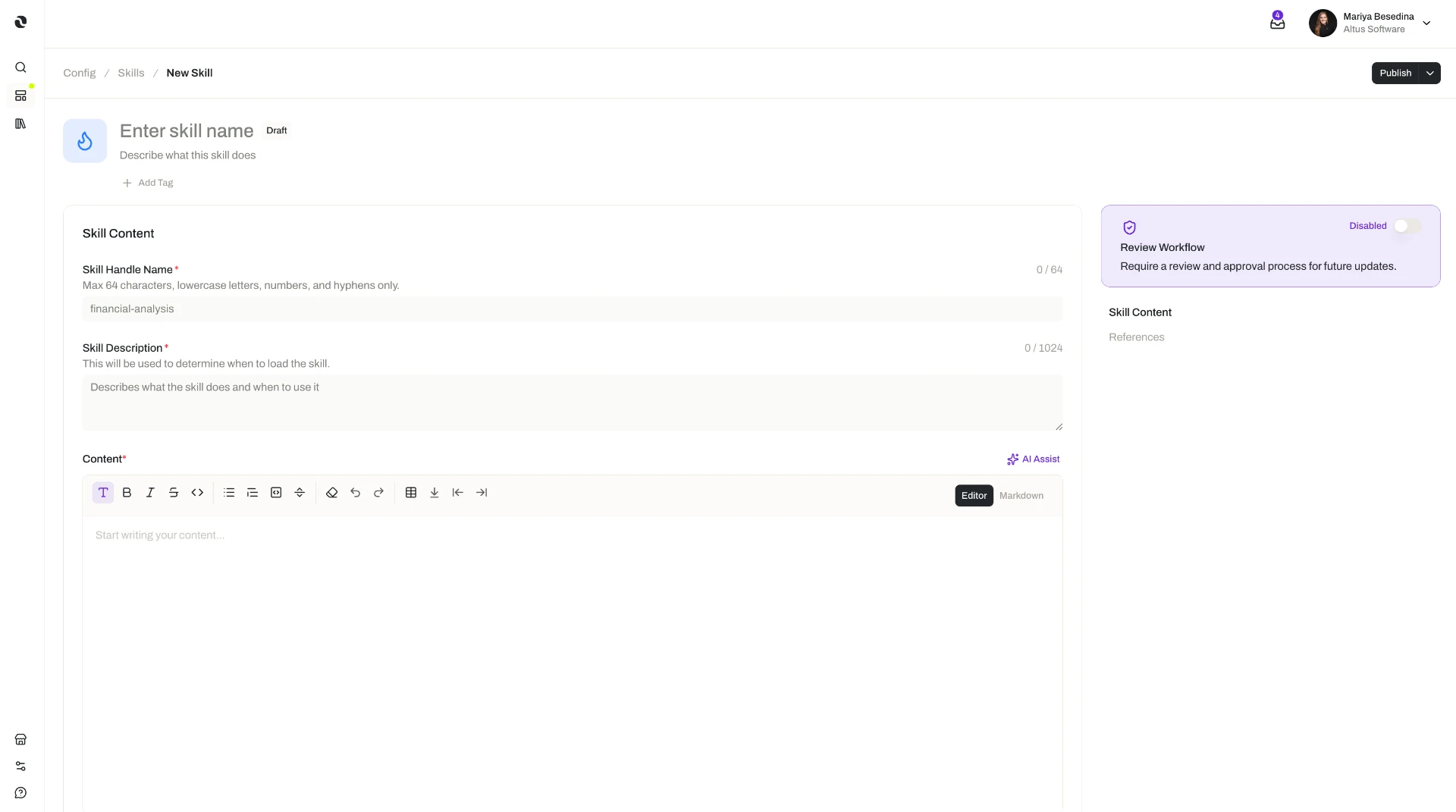
- A primary skill document — the main document describing how the work is performed. You write and edit it in a rich editor, in an intuitive interface, rather than maintaining folders of markdown files.
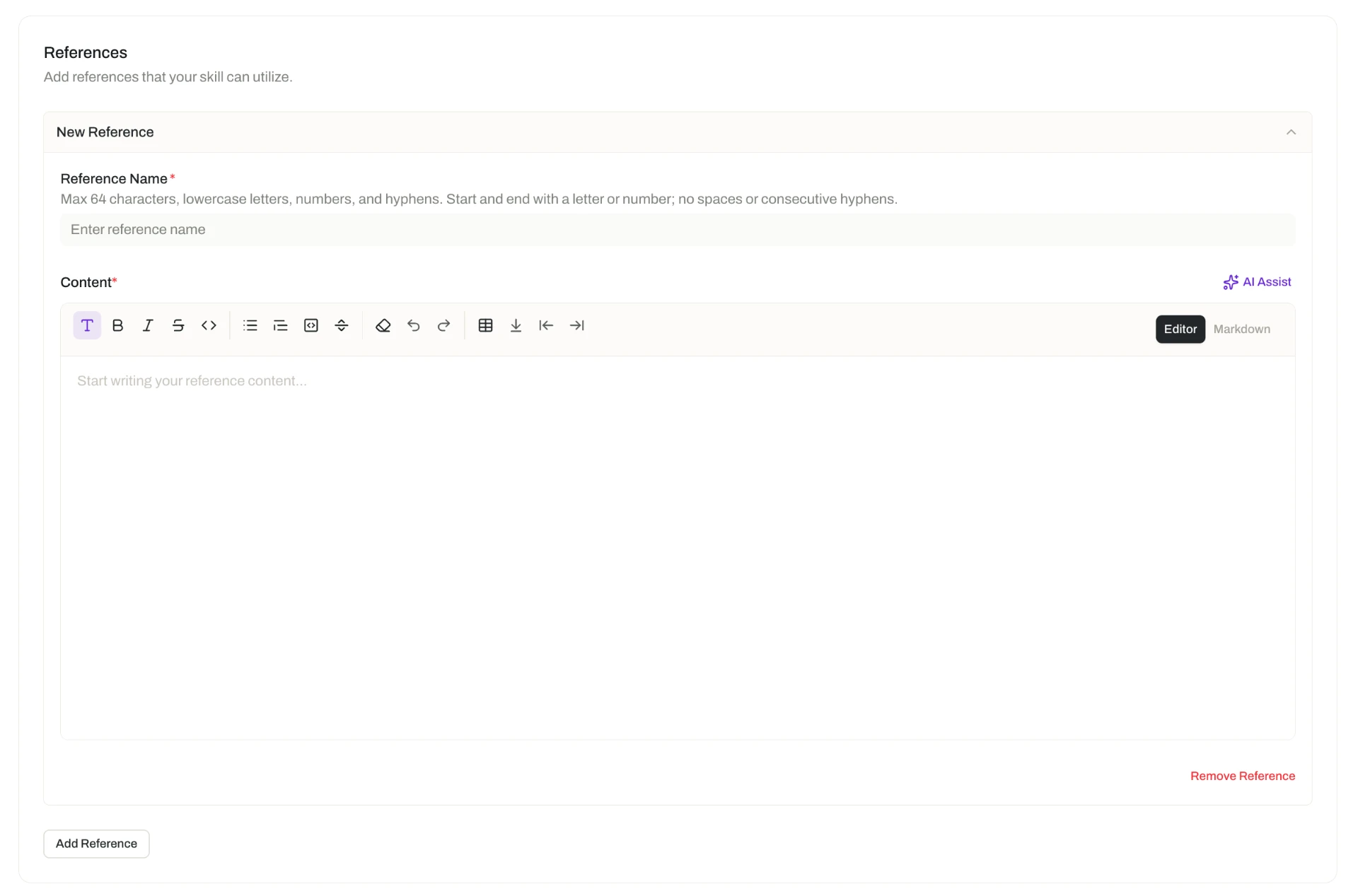
- Any number of reference documents — the supporting material that goes with the method: additional documentation, templates, worked examples, and anything else the work draws on.
Skills and knowledge are not the same thing, and the difference matters. Knowledge is your organization's reference information — the documents, assets, policies, and facts agents draw on to know about the business. Skills are procedural: they tell an agent how to perform a particular kind of work, packaging a repeatable method together with its templates and examples. Knowledge supplies the information; skills supply the method for using it. Most specialized work needs both — the skill that says how a customer brief is structured, and the knowledge that holds the customer's actual details.
- Files and folders in the knowledge base
- Retrieved as grounding context
- Answers 'what do we know?'
- A written method for doing the work
- Attached to an agent as a capability
- Answers 'how do we do this?'
Key Capabilities
- Capture a method as a primary document. Write the process the way you would explain it to a colleague, in a rich editor built for the job.
- Add as many reference documents as the work needs. Supporting documentation, templates, examples, and other materials travel with the skill.
- Attach one skill in many places. A single skill can be attached to agents, spaces, tasks, flows, and templates — agent, task, and flow templates alike — so expertise captured once is applied wherever it is relevant.
- Let agents apply it on their own judgment. An agent decides when a skill is relevant to the request or to a task or flow's instructions, then ingests it — pulling in reference documents as needed — to guide how it works.
- Keep changes controlled. Skills are version controlled and governed by permissions like other resources in Opal, and a publishing workflow can be enabled on a per-skill basis so changes are reviewed before they go live.
How it Works
1. Create the skill and write its primary document. Skills are created in the Skills section of the platform. Start with the primary skill document: the description of how this kind of work is performed. Write it as guidance for someone competent but unfamiliar — the sequence to follow, the standards to meet, the judgment calls to make. Precision here is what makes the output consistent later.
2. Add the reference documents the method depends on. Add as many as you need — a template the output should follow, a completed example to work from, a policy or specification the method refers to. These are part of the skill, so an agent can pull them in as it works rather than needing them supplied in the request.
3. Attach the skill where the work happens. A skill only takes effect once it is attached. You can attach it to:
- An agent — the skill becomes part of that agent's capabilities, alongside its connectors, tools, and widgets. See Agents.
- A space — the expertise becomes available within that operational context.
- A task or a flow — so the right method is applied when that work runs, including work that runs unattended or across multiple steps.
- An agent, task, or flow template — so everything created from that template carries the expertise from the start. See Agent Templates.
4. Let the agent decide when to use it. Attaching a skill does not force it into every response. When an agent judges that a skill is relevant to a user's request, or to the instructions of a task or flow it is running, it ingests the skill and pulls in reference documents as needed to guide how it performs the work. When the skill is not relevant, the agent leaves it alone — so an agent can carry several skills without diluting its attention on any one request.
5. Maintain it like any other resource. Skills are version controlled and permissioned, so you can manage how a method changes over time and control who can access it. Where a skill encodes a standard that others depend on, enable its publishing workflow so each new version is reviewed and released deliberately rather than taking effect the moment it is edited.
Additional Notes
- The quick test for skill versus knowledge: if it describes how to do something, it belongs in a skill; if it is information the work is about, it belongs in knowledge. See Knowledge for Agents.
- Skills, tools, and connectors solve different problems. A skill shapes how an agent works; tools and connectors extend what it can reach and act on. An agent that must both follow your method and update a live system needs both. See Tools.
- Attach broadly used skills once, at the space level. Where every agent in a space should work the same way, attaching the skill to the space avoids repeating it on each agent — and keeps a single place to update when the method changes.
- Templates are how a standard spreads. Including a skill in an agent, task, or flow template means everything created from that template starts with the expertise already in place, rather than relying on whoever builds it to remember.
- Write for an agent's judgment, not for a script. Because the agent decides when a skill applies, a primary document that clearly states what kind of work it covers is easier for an agent to apply at the right moment.
- A skill is written guidance, not code. It is made up of descriptions and instructions that explain how the work is done, so anyone who knows the work can write one.
- Short definitions of the terms used here are in one place: Glossary.
Related Features
- Agents — The digital workers that ingest skills and apply them when the work calls for it. Agents
- Tools — Individual callable actions an agent can invoke; skills shape the method, tools extend the reach. Tools
- Agent Templates — Reusable starting points that can include skills, so new agents carry the expertise from the start. Agent Templates
- Task Templates — Reusable task setups that can include skills, so tasks created from them apply the right method. Task Templates
- Flow Templates — Reusable flow setups that can include skills, so flows created from them apply the right method. Flow Templates
- Knowledge for Agents — The organization's reference information agents draw on, and the counterpart to the procedural expertise a skill provides. Knowledge for Agents
- Spaces — The operational environment a skill can be attached to, making it available to the work done there. Spaces
- Tasks — Work an agent runs on its own; attaching a skill applies the right method to each run. Tasks
- Flows — Multi-step processes whose steps can draw on the skills attached to them. Flows
- Access & Permissions — The full access model behind plans, role permissions, and per-resource permissions. Access & Permissions