
Flows
A flow is a multi-step workflow that coordinates people and agents through a process from start to finish, built as a sequence of steps.
A flow runs inside a space, so you need access to that space to build, assign, or run one, and the permission level you hold there — Manage, Access, or View — sets what you can do. Bringing colleagues and their work together in a shared space relies on resource sharing and permissions, available on the Business and Enterprise plans. The access model is documented in one place: Access & Permissions.
Overview
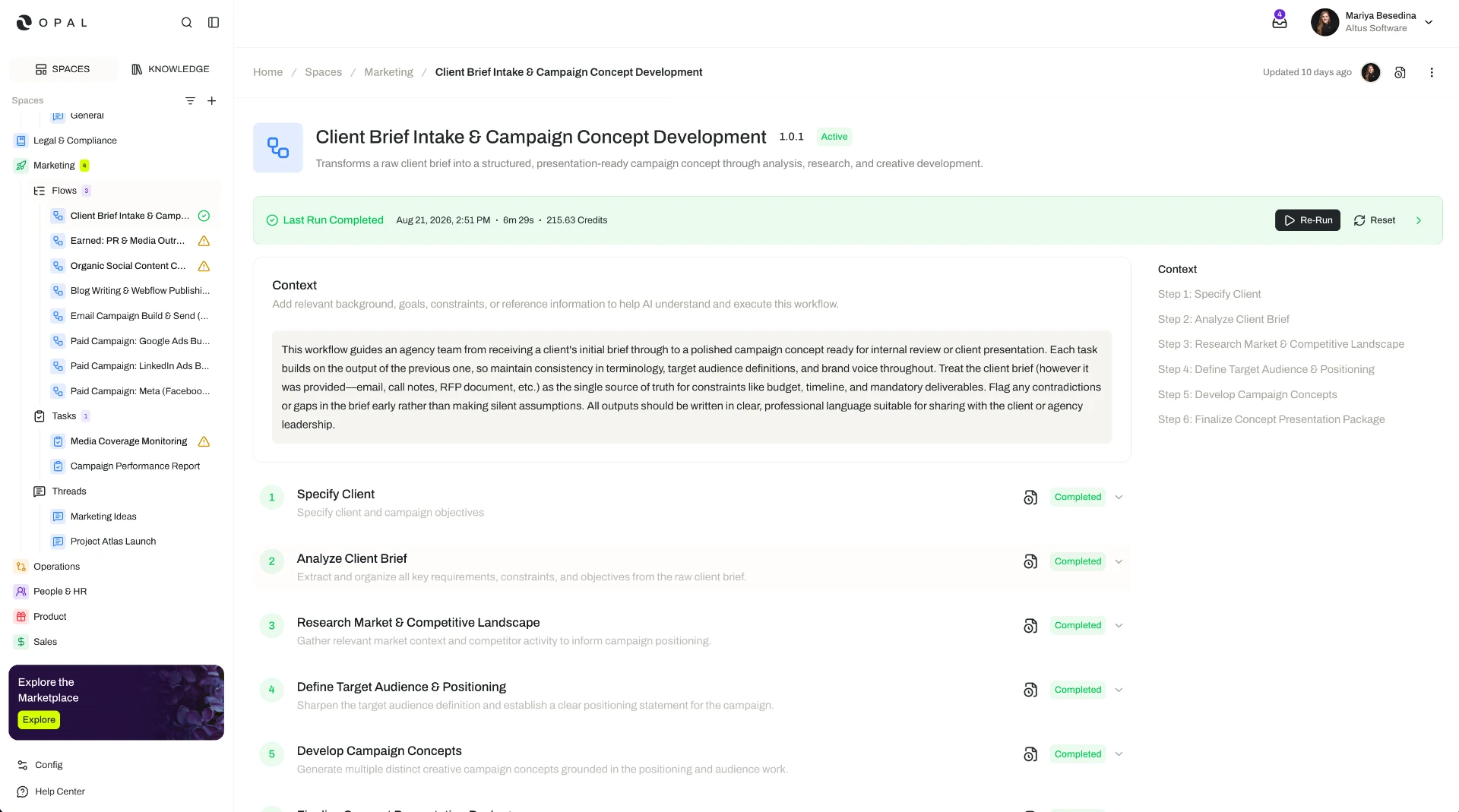
A flow is a multi-step workflow that coordinates people and agents through a complex process from start to finish. It is built as a sequence of steps, and every step carries three things: an assignee — an agent or a person — instructions describing the work, and, wherever you want a checkpoint, a review that has to be passed before the process moves on.
That last part is what makes a flow different from simply running several pieces of work in a row. A step can be gated: the assignee does the work, a reviewer approves it or sends it back with feedback, and only then does the next step begin. Oversight sits inside the process rather than being bolted on at the end of it.
A flow is the right shape for work that:
- Happens in a defined order — research before analysis, analysis before recommendation, recommendation before sign-off.
- Crosses several hands — some steps best done by an agent, others needing a person's judgment.
- Has to be checked along the way — because a mistake at step two is expensive to discover at step nine.
Set up this way, a flow holds the way the work should be done. Onboarding a client, running a transformation project, taking a piece of content from brief to approval — the steps, the assignees, and the checkpoints are configured once and reused, which makes a flow a living, repeatable standard operating procedure (SOP) instead of a process that has to be re-explained every time it runs.
The other two ways of working sit either side of it: a thread is for work you direct live as it unfolds, and a task is a single unit of work handed to one agent to run on its own. A flow is for the whole process.
Key Capabilities
- Lay a process out as steps. Break the work into a sequence of steps, each with a name, an optional description, and its own instructions.
- Assign every step. Give each step an assignee — an agent or a person — to carry out the work.
- Gate a step with review. Optionally add an agent reviewer, a user reviewer, or both to any step, each with their own review instructions.
- Approve or send work back. A reviewer approves the step, with optional comments, or requests changes with written feedback.
- Set the objective once, for the whole flow. Flow-level context describes the overarching goals, requirements, and purpose so every step runs with the same understanding.
- Adapt a single run. Supply additional context when you start a run, to fit that run's circumstances.
- Equip an individual step. Attach knowledge, skills, connectors, tools, and input and output guardrails to a step that needs more than the space and its agents already provide.
- Let a step ask for what it needs. With Request Input, an agent can pause mid-step to request information.
- Let a flow extend itself. With Allow Dynamic Step Creation, a step can add further steps during execution when the work calls for it.
- Pause, reset, and re-run. Stop a run at any point, and re-run it with new context when requirements change.
- Improve with every run. With Continuous Learning, lessons from successful runs are compiled into a document you can read and edit.
- Trace everything. A Run Log records every action taken across the flow and each of its steps.
- Keep the SOP current. Version control lets the flow evolve as the process does.
How it Works
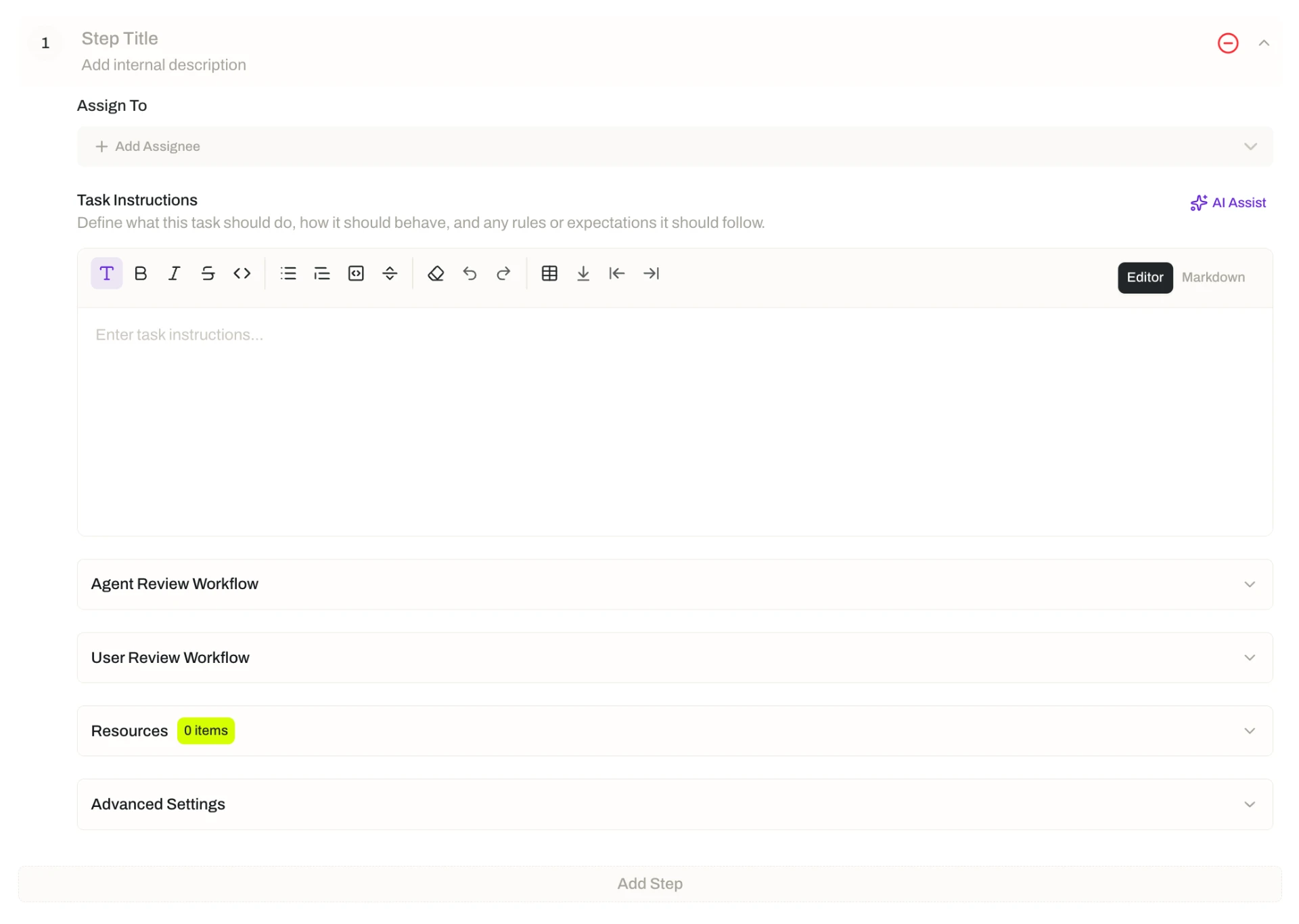
Start by writing down the steps. A flow is a series of steps that execute in order. Each one is configured on its own, and the same set of fields is available on every step:
| Part of a step | What it does |
|---|---|
| Name and description | Identify the step and, optionally, explain what it is for |
| Assignee | The agent or person who carries out the work |
| Instructions | What the assignee should do to complete the step |
| Agent reviewer | An optional agent that checks the step, following its own review instructions |
| User reviewer | An optional person who checks the step, following their own review instructions |
| Step resources | Optional knowledge, skills, connectors, tools, and input and output guardrails, added just for this step |
| Request Input | Lets an agent pause during the step to ask for information it needs |
| Allow Dynamic Step Creation | Lets the step add further steps during execution |
Decide who does each step. Because the assignee is chosen step by step, one flow can hand work back and forth between agents and people as the process moves along — an agent gathering the source material, another drafting from it, a person making the call that follows. Nothing forces a flow to be all-agent or all-human.
Put review where it matters. Any step can have an agent reviewer, a user reviewer, both, or neither. Reviewers work from their own instructions, separate from the ones the assignee follows, so you can describe exactly what to check rather than restating the task. An agent reviewer gives you a consistent second pass on every run; a user reviewer keeps a named person accountable for what leaves that step. A low-risk step can run ungated — review is a tool you place deliberately, not a tax on every step.
Tell the flow what it is trying to achieve. At the flow level, a context field describes the overarching goals, requirements, and purpose of the whole process, so every step runs with a shared understanding of the objective rather than only its own narrow brief. When you start a run, you can add extra context that applies to that run alone — the client, the quarter, the constraint that came up this time.
Add resources only where they are needed. Every step can already draw on the knowledge available in its space and the resources attached to the agents working on it — the assignee and any agent reviewer. That covers most steps without further setup. When one step needs something specific, attach it to that step: knowledge, skills, connectors, tools, and input and output guardrails.
Run it, one step at a time. Flows execute sequentially. A run can be paused or reset at any point, and people are notified when a step needs their input or their review, so nobody has to sit and watch the run to know when their turn comes. Behind the scenes, Opal manages and optimizes the context handed to each step so it runs with what it needs to succeed.
Review a step: approve it, or ask for changes. When a gated step is ready, its reviewer does one of two things — approves it, with optional comments, or requests changes by providing written feedback. Approval is what releases the process to continue.
When requirements change, reset rather than rebuild. Every run produces a detailed Run Log, and each new run can draw on the Run Logs of previous runs. So when something shifts mid-project, you do not start again: reset the current run and re-run it with the new requirements as additional context. Opal analyzes the work already completed at each step and decides whether that step has to be redone or can be skipped — reworking what the change actually affects and leaving the rest.
Let each run teach the next one. With Continuous Learning enabled, observations and lessons from each successful run are compiled into a Continuous Learning document that you can view and edit. Together with version control, that is what keeps a flow a living SOP: it gets sharper with use instead of quietly drifting out of date.
Reuse a process that works. When the same process runs repeatedly, a flow template packages the whole configuration — the step sequence, instructions, assignments, reviewers, resources, and flow context — into a reusable starting point, with placeholders for the details that change each time. A flow created from a template stays linked to it, and you choose when to sync it with the template's latest version.
Additional Notes
- Steps run one at a time. Flows execute sequentially; steps do not run in parallel. Steps can be introduced during a run only where Allow Dynamic Step Creation is enabled, and those steps are added linearly, keeping the sequence intact.
- Task or flow? A task is a single unit of work assigned to one agent, with a trigger that decides when it runs. A flow is an end-to-end process across multiple steps, assignees, and reviewers. If you find yourself describing the work as "first this, then that, then someone checks it," it is a flow.
- Review instructions are worth writing carefully. A reviewer follows its own instructions, not the assignee's. Saying what "good" looks like for that step — the specific things to verify — is what turns a review gate into a real quality check rather than a rubber stamp.
- Reset is a normal part of running a flow, not a failure. Because a re-run reasons over the Run Logs of what came before, resetting is the intended way to absorb a change of direction partway through a long process.
- Everything is on the record. The Run Log captures every action across the flow and each step, so a completed run can be audited and the reasoning behind a decision can be traced back.
- Flows are governed like other resources. Version control lets the flow change deliberately, with earlier versions kept, and access to it is controlled through the space it lives in.
Related Features
- Spaces — The operational environment a flow runs in, providing its ownership, access control, and the shared knowledge and resources every step can draw on. Spaces
- Threads — Conversations between people and agents, for work you want to direct live as it unfolds rather than lay out as a sequence of steps. Threads
- Tasks — A single unit of work assigned to an agent to run on its own, where a flow coordinates a whole process across multiple steps, assignees, and reviewers. Tasks
- Agents — The digital workers assigned to execute steps in a flow and to review them. Agents
- Flow Templates — Reusable starting points for creating flows, so a proven process can be standardized and used again across the organization. Flow Templates
- Access & Permissions — The full access model behind plans, role permissions, and the permission levels granted in a space. Access & Permissions