
Collaborate on a Project in a Shared Thread
Run real project work in one shared thread with colleagues and specialized agents.
Goal
Run a real piece of project work in one shared thread — several colleagues and several specialized agents working the same problem in the same conversation, in an order you control.
A thread is the right home for work whose shape is still forming: you direct it as it unfolds and change course on what comes back, rather than specifying everything up front. What this guide adds to your first thread in the Quickstart is scale in two directions at once — more than one agent, and more than one person, in the same conversation.
The example used throughout is a team with four days to produce a proposal for a customer. It needs background research, a first draft, a pass against the team's standards, and sign-off from the account manager — four different kinds of expertise on one deadline.
By the end you will have practiced:
- adding both people and agents to a thread as participants
- invoking an agent with
@, and deciding the order several agents answer in - pulling colleagues in at the moment they are actually needed
- keeping one conversation instead of four parallel ones
- recognizing the point at which work should move out of a thread into a task or a flow
This guide assumes you already know what threads, spaces, and agents are, and points to those pages rather than repeating them.
Prerequisites
Everything in this guide happens inside a space, so you need access to that space, and the permission level you hold there — Manage, Access, or View — sets what you can do in it. Creating a space, adding agents into it, and inviting colleagues to it depend on your organization's plan and the role permissions you have been granted; sharing a space with other people relies on resource sharing and permissions, available on the Business and Enterprise plans. The access model is documented in one place: Access & Permissions.
- The first-time walkthroughs behind you. This guide starts where the Quickstart ends. If you have not yet built an agent, added knowledge, created a space, and run a thread, work through Quickstart first.
- A space for the project, with its knowledge in it. The thread you create belongs to a space and inherits that space's context, so the material the work depends on — the customer's brief, previous proposals, your pricing and policy references — should already be there. See Spaces.
- At least two specialized agents, already added into that space. Adding an agent into a space is what puts it to work there. Each one should be narrow: the point of a multi-agent thread is that different agents bring different expertise. See Agents.
- The colleagues who need to take part, with access to the same space. The permission level you grant each person in the space sets what they can do there.
- One project worth collaborating on. A real deliverable, with a deadline and more than one kind of expertise involved. Work that only needs one person and one agent does not need this guide.
Steps
1. Confirm the space has everything the conversation will need.
Open the space the project lives in and check three things: the agents you intend to use are in it, the knowledge the work depends on is in it, and the colleagues who will take part have access to it. Anything added at the space level — knowledge, skills, connectors, tools, widgets, guardrails — is available to every agent working there, so this is the moment to add a shared capability once rather than discovering halfway through the conversation that only one agent can reach it.
In the example, the proposal space holds the customer brief and two previous proposals as knowledge, plus a connector to the CRM that any agent in the space can use.
2. Decide which agents belong in the conversation, and why.
Name the distinct kinds of expertise the deliverable needs, then map one agent to each. If two agents would answer a question the same way, you only need one of them.
For the proposal, the team settles on three:
- a research agent to pull together the customer's history and the competitive context
- a drafting agent to write the proposal sections
- an editor agent to check a draft against the team's standards for claims, tone, and structure
3. Create the thread and open it with the outcome, not the first task.
Create a thread in the space and start with a short framing message: what the finished thing is, when it is due, and any constraints everyone needs to respect. Everyone who joins later reads the same framing, which is much of the value of working in one place.
"We're producing a proposal for Northwind by Thursday. Scope is the two workstreams in their brief — no pricing commitments beyond our standard rate card."
4. Add the participants — people and agents both.
Add the three agents and the colleagues who will take part: in the example, the solutions lead who owns the technical content and the account manager who signs off.
Taking part in a thread comes from being added to it, not from being tagged in it. Get everyone into the room before the work starts, and you can turn to any of them later without interrupting the conversation to add them.
5. Put the first sequence of work in a single message.
You can tag more than one agent in one message, and they respond in the order you tagged them. That one detail is what makes a multi-agent thread orderly instead of noisy: you line up a chain of work in a single message and the answers arrive in the sequence you intended.
"@ResearchAgent summarize Northwind's account history and the two competitors named in their brief. @DraftingAgent using that summary, draft the executive summary and the delivery approach sections."
The research agent answers first, because it was tagged first; the drafting agent follows, building on the summary it can now see. Each agent responds using the knowledge available in the space as well as its own capabilities — its skills, connectors, tools, widgets, and guardrails — so the research is grounded in your material rather than assembled from nothing. Some responses may arrive as an interactive widget you can work with directly rather than as text to read.
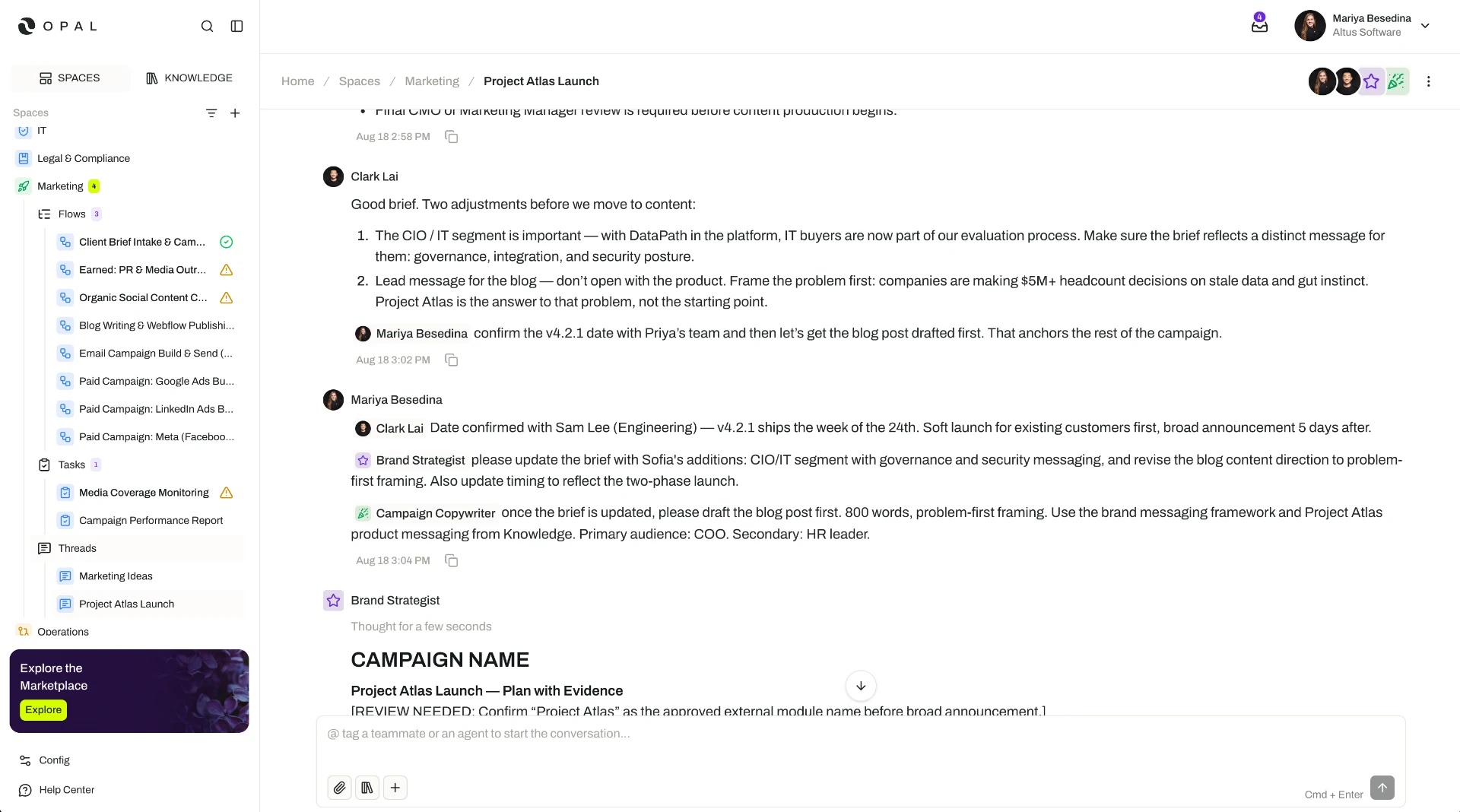
6. Steer as the work comes back.
Read what arrives and direct the next move in plain language, the same way you would with a colleague. Ask for a section to be rewritten shorter, redirect the research toward a competitor that turned out to matter more, or ask for the assumptions behind a claim. Nothing in a thread has to be right the first time; you are steering, and you can review and refine what an agent produces at any point.
7. Ask one agent to look at another's work.
Because every agent in the thread can see the conversation, you can turn to a second agent for a considered second pass:
"@EditorAgent review the delivery approach section above against our proposal standards and flag anything unsupported."
This is still a conversation — you are asking, and adjusting based on the reply. When you want that checking to happen every time, without anyone asking, it belongs in a task or a flow, where an agent can be formally assigned as a reviewer with its own review instructions. Both of the guides listed below show that pattern.
8. Bring your colleagues in at the moment they are needed.
Tag a person with @ to notify them and draw them into the conversation. Timing is the skill here: pull the solutions lead in once there is a draft worth their scrutiny, and the account manager in once the proposal is close enough to sign off.
"@Priya the delivery approach is drafted and edited — can you check the technical assumptions? @Marcus proposal is ready for your read before it goes out Thursday."
They arrive into a conversation that already contains the framing, the research, the draft, and the edit. Nobody has to be caught up by hand, and nobody has to ask a question the thread has already answered.
9. Keep the work in one thread.
The pull toward splitting up is strong — a side conversation with one agent here, a direct message to a colleague there. Resist it. When several people share a thread, they work from the same exchange and the same set of agent responses: questions are not repeated, decisions are visible to everyone who needs them, and the shared conversation uses tokens more efficiently than running the same work in parallel conversations.
- Everyone works from the same exchange
- No repeated questions
- Decisions visible to all
- Efficient token use
- Parallel, divergent versions
- Context repeated in each one
- Hand-offs by copy and paste
10. Decide what should not have been a conversation.
At the end of a project, some of what you did live turns out to be the same every time. That is the signal to move it: work that should run on its own, on a cadence, belongs in a task, and a process with a defined sequence of steps and review along the way belongs in a flow. Threads are for the part that genuinely needs judgment in the moment.
Result
You have delivered a real piece of project work in a single shared thread. Specifically:
- One conversation, several kinds of expertise. Three specialized agents and two colleagues worked the same problem in the same place, each contributing what they are good at, instead of one general-purpose assistant being asked to cover everything.
- Answers in the order you intended. Tag order gave you a predictable sequence, so the drafting built on the research rather than guessing at it.
- Work grounded in your own material. Every agent response drew on the space's knowledge and the agent's own capabilities, so the output reflects your customer, your standards, and your constraints.
- Colleagues in the loop without a handover. Tagging brought people into a conversation that already held the context, so review happened where the work was rather than in a separate thread of email.
- No duplicated effort. One shared thread meant no repeated questions, no divergent versions, and more efficient use of tokens than the same work run in parallel conversations.
- A clear line between conversation and process. You now know which parts of this project needed live direction and which parts should become a task or a flow next time.
This is the everyday shape of collaborating with a digital workforce: people and agents in one operational environment, moving a deliverable from intention to done in the time a single hand-off used to take.
Related Guides
- Threads — The full picture of participants, tagging, tag order, and multi-agent conversations. Threads
- Spaces — What a space holds, how space-level capabilities are shared, and how its permission levels work. Spaces
- Agents — How an agent is configured and specialized, and everything it can be assigned to do. Agents
- Automate a Weekly Status Report — The next guide: taking work that repeats on a cadence out of the conversation and giving it to an agent as a task. Automate a Weekly Status Report
- Build a Content Review & Approval Workflow — Turning a multi-step process into a flow, with people and agents assigned to steps and formal review at each one. Build a Content Review & Approval Workflow