
Connectors
A connector is a secure link between Opal and an external system your organization already uses, so agents, tasks, and flows can work with it directly.
Defining an MCP Server, creating connections from it, and attaching those connections to agents, spaces, tasks, and flows depends on your organization's plan, the role permissions you have been granted, and the permissions set on the individual connection. The access model is documented in one place: Access & Permissions.
Overview
A connector is a secure link between Opal and an external tool or system your organization already uses, so agents, tasks, and flows can work directly with that system instead of in isolation.
Most useful work depends on something outside the conversation: the ticket in the help desk, the record in the CRM, the item in the inventory system. Without a connector, an agent can reason about that work but not reach it — it can tell you what to do, then hand the doing back to you. A connector closes that gap. The agent fetches the live data and takes the action in the system itself, so work is completed rather than merely recommended.
Connectors are built on the Model Context Protocol (MCP) — the protocol Opal uses to integrate with external systems. Any service that supports remote MCP can be connected by supplying its address and choosing how to authenticate, so bringing a system into Opal is a configuration exercise rather than a development project.
Setting one up involves two components, and the distinction between them is worth getting clear early:
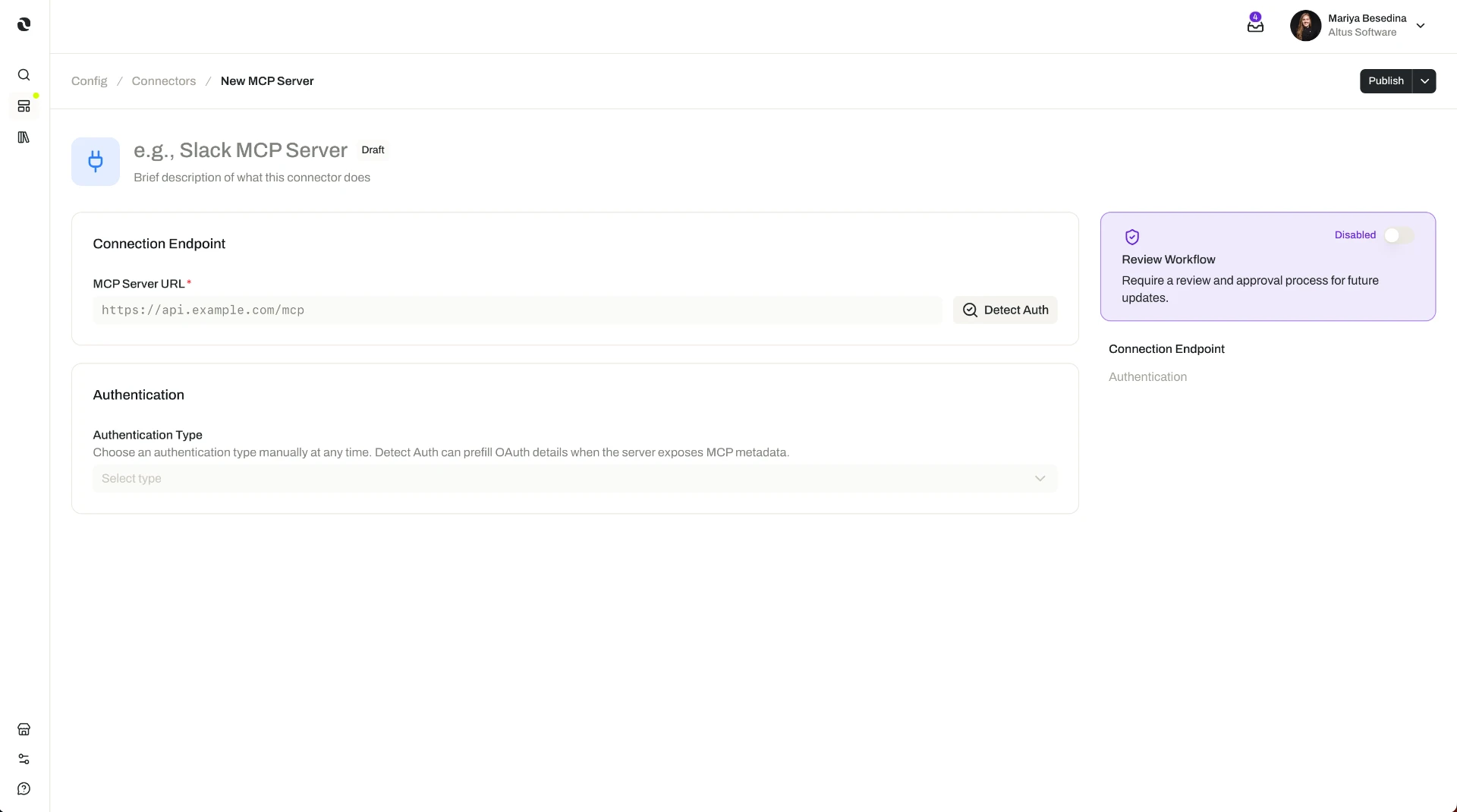
- An MCP Server holds the connection details for a service — its URL and how to authenticate with it. It is defined once for the service.
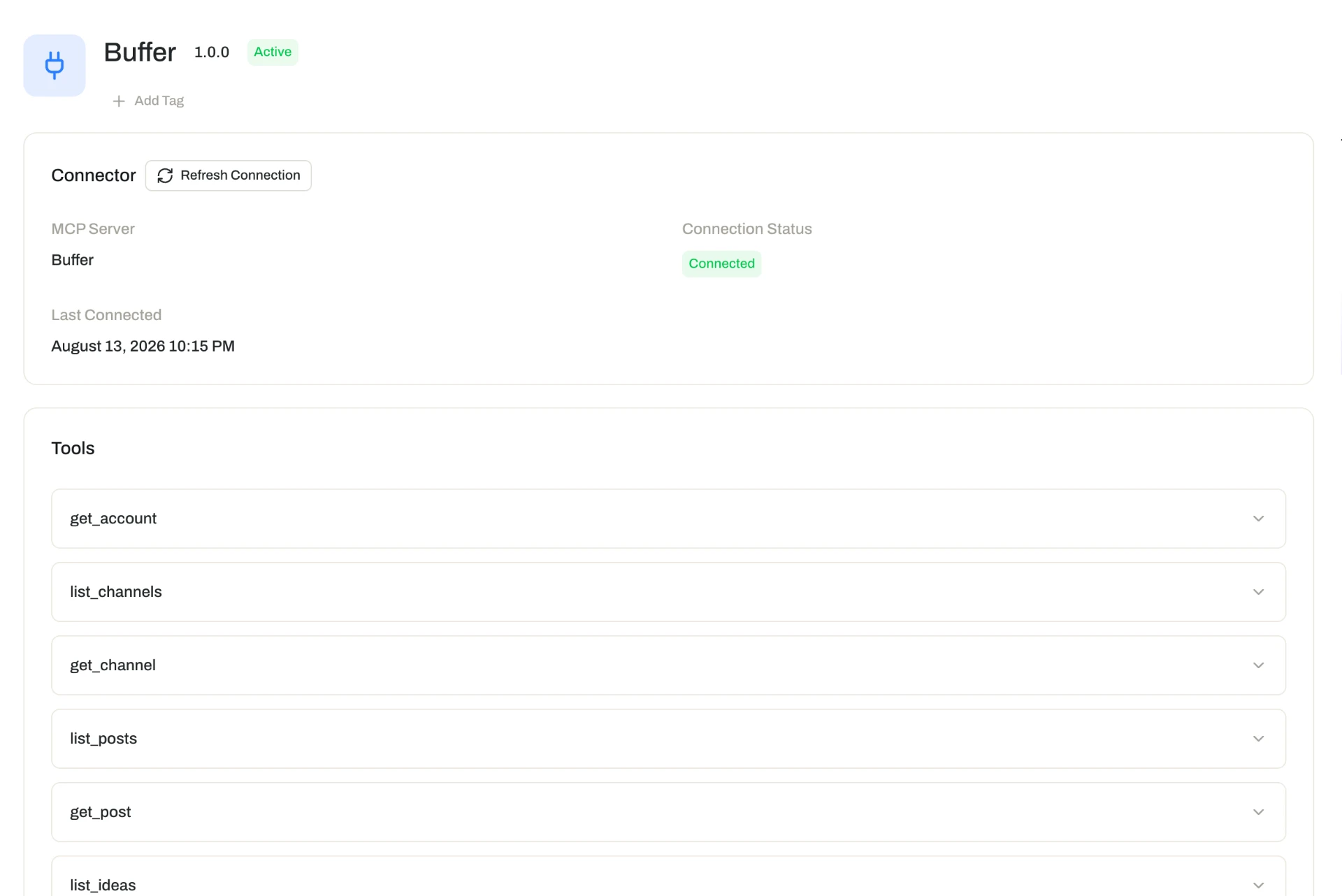
- An MCP Connection is one person's link to that server. Each user creates their own, and it carries that individual's permissions in the connected system.
One server, many connections: the organization decides what Opal can connect to, and each person's own access decides what they can reach through it.
Key Capabilities
- Connect to systems that support remote MCP. Link Opal to the external tools and services your organization already runs on.
- Let agents, tasks, and flows act on live systems. Fetch data from a connected service or call its APIs as part of the work.
- Choose how to authenticate. Three methods are supported: None, Bearer Token, and OAuth.
- Let Opal detect the setup for you. Auto-detect identifies a service's authentication type — and, for OAuth, its configuration details — with manual configuration available when you want full control.
- Give every person their own connection. Connections are user-specific, so each one carries that individual's permissions and available functionality in the connected system.
- Attach connections where the work happens. A connection can be attached to agents, spaces, tasks, and flows.
- Reuse a server across templates. Define a server-level integration on an agent, task, or flow template so everything created from it can be paired with the right connection at creation time.
How it Works
1. Define the MCP Server. An administrator provides the server's URL for a service that supports remote MCP and chooses an authentication type — None, Bearer Token, or OAuth. Opal's auto-detect can identify the authentication type for you and, for OAuth, work out the configuration details; you can also configure the server manually if you would rather set it up yourself. This step happens once per service.
2. Each user creates their own MCP Connection. With the server in place, people create connections from it — authorizing with their own account for the connected service. Because each connection is user-specific, it reflects exactly the permissions and functionality that service grants to that person. Nobody gains access through Opal that they do not already have in the system itself.
3. Attach the connection where the work happens. A connection only has an effect once it is attached. You can attach it to:
- An agent — the connected system becomes part of what that agent can reach, alongside its skills, tools, and widgets. See Agents.
- A space — extending access to the connected system within that operational environment.
- A task or a flow — so automated and multi-step work can reach external systems while it runs. See Tasks and Flows.
4. Put servers on templates so new work starts connected. MCP Servers can be attached to agent templates, task templates, and flow templates as definitions. When someone creates a new agent, task, or flow from one of those templates, they are prompted to select a specific MCP Connection for the defined server — an optional step that lets each person bring their own access to a standard setup.
Additional Notes
- Remote MCP only. Opal does not support local MCP servers, because it is a cloud-based platform. A service has to support remote MCP to be connected.
- Connections inherit each person's access, not the organization's. Two people using the same agent may see different results from the same connected system, because each connection carries its owner's permissions there. That is the intended behavior: existing access rules in the connected system continue to apply. For the organization-wide controls that govern who can sign in and participate in the first place, see Security.
- Connector or tool? Where a system offers an MCP-based integration, a connector is usually the better choice — it exposes that system's functionality and respects each user's permissions. Reach for a tool when you need a direct HTTP call to a service that has no MCP integration. See Tools.
- Attach broadly used connections at the space level. Where the work of a whole team depends on one system, attaching at the space level saves repeating the same attachment on every agent.
- Templates are how a connected setup spreads. Defining the server on a template means each new agent, task, or flow arrives ready to be paired with a connection, rather than relying on whoever builds it to remember the integration.
- Short definitions of the terms used here are in one place: Glossary.
Related Features
- Agents — The digital workers that use connections to retrieve data and act in external systems. Agents
- Tools — Individual callable actions, including direct HTTP calls to services that have no MCP integration; the complement to a connector's system-level integration. Tools
- Skills — Packaged expertise that shapes how an agent works, where connectors extend what it can reach. Skills
- Tasks — Work an agent runs on its own; attaching a connection lets each run reach the systems it depends on. Tasks
- Flows — Multi-step processes whose steps can act in connected systems as they run. Flows
- Spaces — The operational environment a connection can be attached to, extending external-system access to the work done there. Spaces
- Agent Templates — Reusable agent setups that can carry an MCP Server definition, with the connection chosen at creation time. Agent Templates
- Task Templates — Reusable task setups that can carry an MCP Server definition, with the connection chosen at creation time. Task Templates
- Flow Templates — Reusable flow setups that can carry an MCP Server definition, with the connection chosen at creation time. Flow Templates
- Security — Organization-wide security controls, including single sign-on, enforced authentication, and role-based access. Security
- Access & Permissions — The full access model behind plans, role permissions, and per-resource permissions. Access & Permissions