
Security
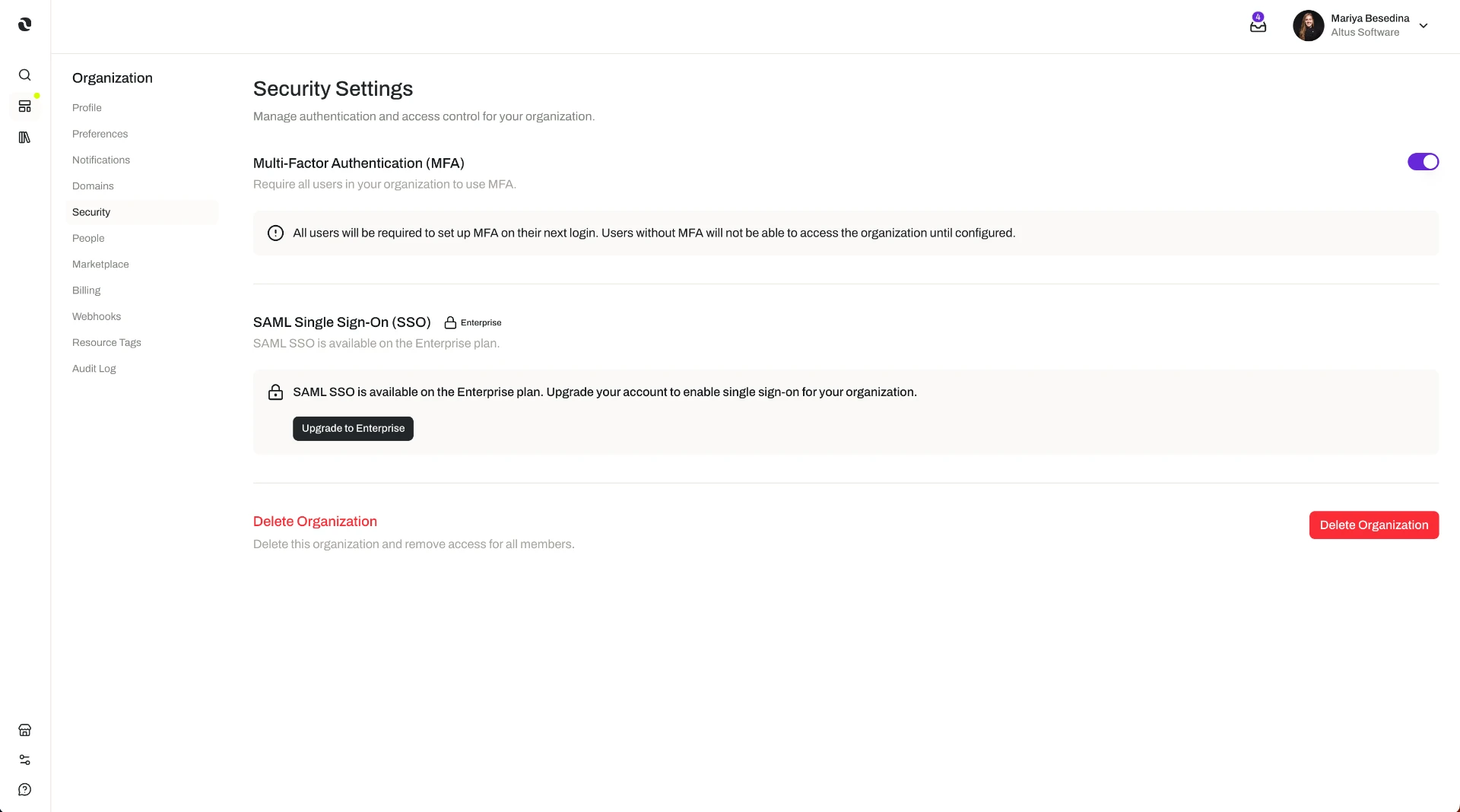
The organization-wide controls that decide who can get into your Opal organization and how they prove who they are: enforced MFA, SAML single sign-on, and verified email domains.
Changing an organization's security settings is a high-privilege organization-level administrative action, and SAML single sign-on is available on the Enterprise plan only — so what you can see and configure depends on your organization's plan and the role permissions you have been granted. The access model is documented in one place: Access & Permissions.
Overview
An organization's security settings are the organization-wide controls over how people get into your organization on Opal and how they prove who they are when they sign in. They are where you align Opal with the company's existing security and identity standards, rather than treating it as a separate island with its own rules.
Three controls sit here:
- Enforced multi-factor authentication (MFA). Require every member of the organization to use multi-factor authentication.
- SAML single sign-on (SSO). Let members authenticate through the company's own identity provider (Enterprise plan only).
- Email domains. Add and verify the company's email domain(s). A verified domain enables auto-discovery, so people whose email address matches it can join, or request to join, the organization — which makes domain verification a security decision as much as an onboarding one.
Security settings are managed in Organization Settings — the central area where administrators control the organization's profile and preferences, security, membership, teams and roles, billing, and credits. Deciding who can get in and deciding how they authenticate happen next to each other, in the same place as everything else about the organization.
This is the front door, not the whole building. Security settings govern who can be admitted and how they authenticate. What a member is then allowed to do is governed separately, by role-based access control — see Roles & Permissions (RBAC).
Opal treats governance and controlled access as foundational rather than as something added after deployment: as agents and people gain access to real information, real systems, and real decisions, secure and controlled access is part of what makes a digital workforce safe to scale.
Key Capabilities
- Enforce MFA for all members. Require multi-factor authentication across the whole organization, so a password alone is never enough to sign in.
- Configure SAML single sign-on. Let members authenticate through the company's identity provider instead of signing in to Opal separately (Enterprise plan only).
- Add and verify email domains. Register the company's email domain(s) with the organization and verify them.
- Control self-service joining through auto-discovery. A verified domain lets people with a matching email address join, or request to join — so the domains you verify decide who can find their way in.
- Administer security alongside everything else. Security sits in Organization Settings with membership, teams and roles, billing, and credits, so organization administration has one home.
How it Works
Security settings are administered from Organization Settings. An organization's settings are managed from one central area, and security sits there alongside membership, teams and roles, billing, and credits.
Enforce MFA across all members. An administrator can enforce multi-factor authentication for all members of the organization. It is an organization-wide setting rather than a per-person one: once enforced, it applies to every member, so the organization's authentication standard does not depend on individuals opting in.
Configure SAML single sign-on on the Enterprise plan. On the Enterprise plan, an administrator can configure SAML single sign-on so that members authenticate through the organization's own identity provider. The practical effect is that Opal follows the company's existing identity standards: sign-in is centralized where the rest of the company's access already lives, instead of being managed separately here. Whether your organization is on the Enterprise plan is part of its subscription — see Billing & Subscription.
Add a domain, then verify it. Adding an email domain and verifying it are two separate steps, and verification is the one that matters: an unverified domain does not enable auto-discovery. Once a domain is verified, people whose email address matches it can join, or request to join, the organization based on that address.
Verified domains shape who can get in. This is why the domain list is a security control and not just a convenience. Verifying example.com opens self-service discovery to everyone with an address on that domain; leaving a domain off the list means people using it must be invited directly instead. Administrators approve join requests, so self-service discovery does not become open access. Invitations, join requests, and approvals are covered by Members.
Authentication and authorization are different decisions. Enforced MFA and single sign-on determine how a member proves who they are. They do not determine what that member can do — that comes from the preset or custom role assigned to them or to their team, and from the permissions on individual resources. See Roles & Permissions (RBAC) and Access & Permissions.
Changes to security settings leave a record. Organization activity is captured in an audit log that shows what changed and who changed it. That record is what makes it possible to review a change to a security setting after the fact — when a domain was verified, or when enforcement was turned on — rather than relying on memory. See Audit Log.
Additional Notes
- This page explains which controls exist, not the values to enter. The configuration screens in Organization Settings are the accurate source for what a given setting currently requires, and the details needed for SAML single sign-on come from your own identity provider.
- SAML single sign-on is plan-gated. It is available on the Enterprise plan only. How plan gating, role permissions, and per-resource permissions fit together is documented once, in Access & Permissions.
- Enforced MFA applies to all members. It is not configured person by person, so treat it as a decision about the organization's standard rather than about individual accounts.
- Verifying a domain does not replace invitations. Direct invitations remain available whether or not a domain is verified, and they do not depend on one. The two routes run side by side: see Members.
- Signing in is not the same as being allowed to act. Security settings decide admission and authentication; roles and resource permissions decide what happens next. Roles & Permissions (RBAC)
- Short definitions of the terms used here are in one place: Glossary.
Related Features
- Members & Access — The cluster this page belongs to: members, teams, roles, and security in one place. Members & Access
- Members — Invitations, verified-domain auto-discovery, and the approval of join requests. Members
- Teams — Group members into teams and nested child teams within the secured organization. Teams
- Roles & Permissions (RBAC) — What members are allowed to do once they have authenticated. Roles & Permissions (RBAC)
- Access & Permissions — The full access model behind plans, role permissions, and per-resource permissions. Access & Permissions
- Audit Log — The record of organization activity, used to review changes to security settings and access. Audit Log
- Billing & Subscription — The subscription plan that determines whether SAML single sign-on is available. Billing & Subscription