
Members
How people join your organization on Opal — by direct invitation or via verified-domain auto-discovery with admin approval.
Inviting members, adding and verifying email domains, and approving join requests are organization-level administrative actions, so what you can see and do depends on your organization's plan and the role permissions you have been granted. The access model is documented in one place: Access & Permissions.
Overview
Members are the people who belong to your organization on Opal. An organization is a single tenant on the platform — the top-level container that holds its members, teams, roles, resources, and organization-wide settings — and membership is what puts a person inside it. Every member belongs to an organization, and getting the right people in is the first step before any of the rest of organization administration matters.
There are two ways into an organization, and they are designed to be used together:
- A direct invitation. An administrator invites someone to the organization.
- A verified email domain. An administrator adds and verifies the company's email domain, which enables auto-discovery: people with a matching email address can join, or request to join, without waiting to be invited. Administrators approve join requests, so admission stays under their control.
Both are managed in Organization Settings — the central area where administrators control the organization's profile and preferences, security, membership, teams and roles, billing, and credits.
The practical effect is controlled, self-service onboarding. A direct invitation is precise, and it does not depend on any domain being set up first. Auto-discovery scales: once a domain is verified, colleagues can find the organization themselves instead of queuing behind an administrator, and approving join requests keeps an administrator in the loop.
- Admin sends an invitation
- The invitee accepts and joins
- Someone signs up with a matching verified domain
- A join request is created
- An administrator approves it
Key Capabilities
- Invite new members directly. Add a specific person to the organization by invitation.
- Add and verify email domains. Register the company's email domain(s) with the organization and verify them.
- Enable auto-discovery. A verified domain lets people with a matching email address join, or request to join, based on that address.
- Approve join requests. Review and approve requests to join, so administrators decide who is admitted.
- Administer membership alongside everything else. Membership sits in Organization Settings with teams, roles, security, billing, and credits, so there is one place to go for organization administration.
How it Works
Everything is managed from Organization Settings. An organization's settings are managed from a central Organization Settings area. Membership is one part of it, next to teams and roles, security, billing, and credits.
Route one — invite someone directly. An administrator invites a new member to the organization. This is the direct route, and it does not depend on any domain being set up first.
Route two — verify a domain and let people come to you. An administrator adds the organization's email domain and verifies it. Verification is what activates auto-discovery: with a verified domain in place, people whose email address matches it can join, or request to join, based on that address. Adding a domain and verifying it are separate steps — an unverified domain does not enable auto-discovery.
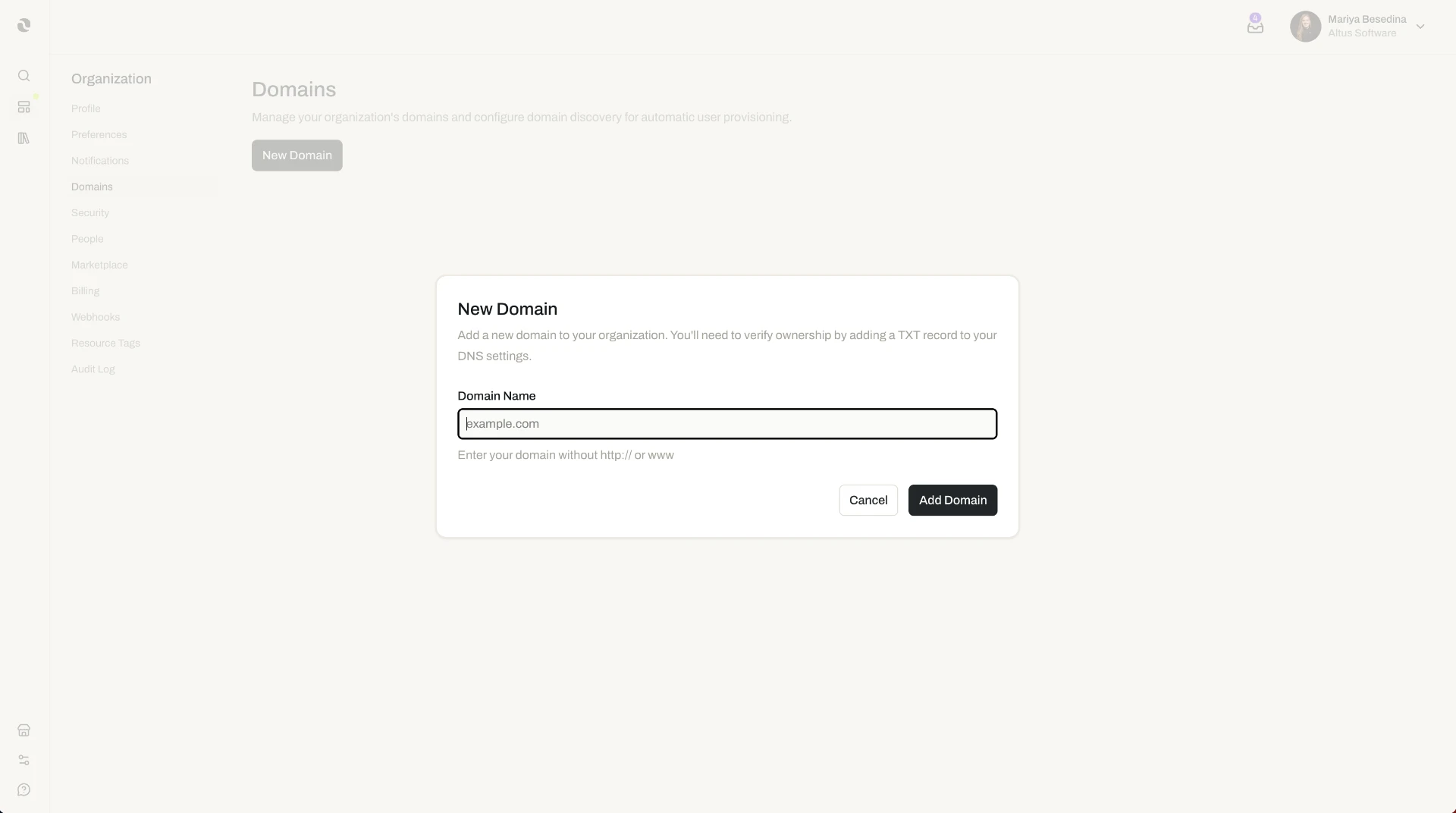
Join requests are approved by an administrator. When someone requests to join, an administrator reviews and approves the request. This is the control point that keeps self-service joining from becoming open access: the organization can invite discovery while still deciding who is actually admitted.
Once someone is a member. Membership puts a person in the organization; it does not by itself decide how they are grouped or what they can do. From there, administrators organize members into teams and nested child teams, and grant access by assigning preset or custom roles to individual members or to whole teams. Those are covered by Teams and Roles & Permissions (RBAC).
Additional Notes
- The two routes complement each other. Verifying a domain does not take away an administrator's ability to invite people directly. Direct invitations stay available, and they do not depend on a verified domain being in place.
- Membership, structure, and permissions are separate decisions. Who belongs to the organization is decided here. How people are grouped is decided in Teams, and what they can do is decided in Roles & Permissions (RBAC).
- How members sign in is configured separately. Requirements such as enforced multi-factor authentication and single sign-on are organization security settings, covered by Security.
- Seats and plan are part of billing. The organization's subscription plan and seats are managed with the rest of billing, in Billing & Subscription.
- Short definitions of the terms used here are in one place: Glossary.
Related Features
- Members & Access — The cluster this page belongs to: members, teams, roles, and security in one place. Members & Access
- Teams — Group members into teams and nested child teams, and assign access to a team as a whole. Teams
- Roles & Permissions (RBAC) — Preset and custom roles, and how they are assigned to members and teams. Roles & Permissions (RBAC)
- Security — The organization's security settings and controls, including how members authenticate. Security
- Profile & Preferences — The organization's own identity details and organization-wide preferences. Profile & Preferences
- Billing & Subscription — The subscription plan and the seats the organization's members occupy. Billing & Subscription
- Access & Permissions — The full access model behind plans, role permissions, and per-resource permissions. Access & Permissions