
Knowledge Overview
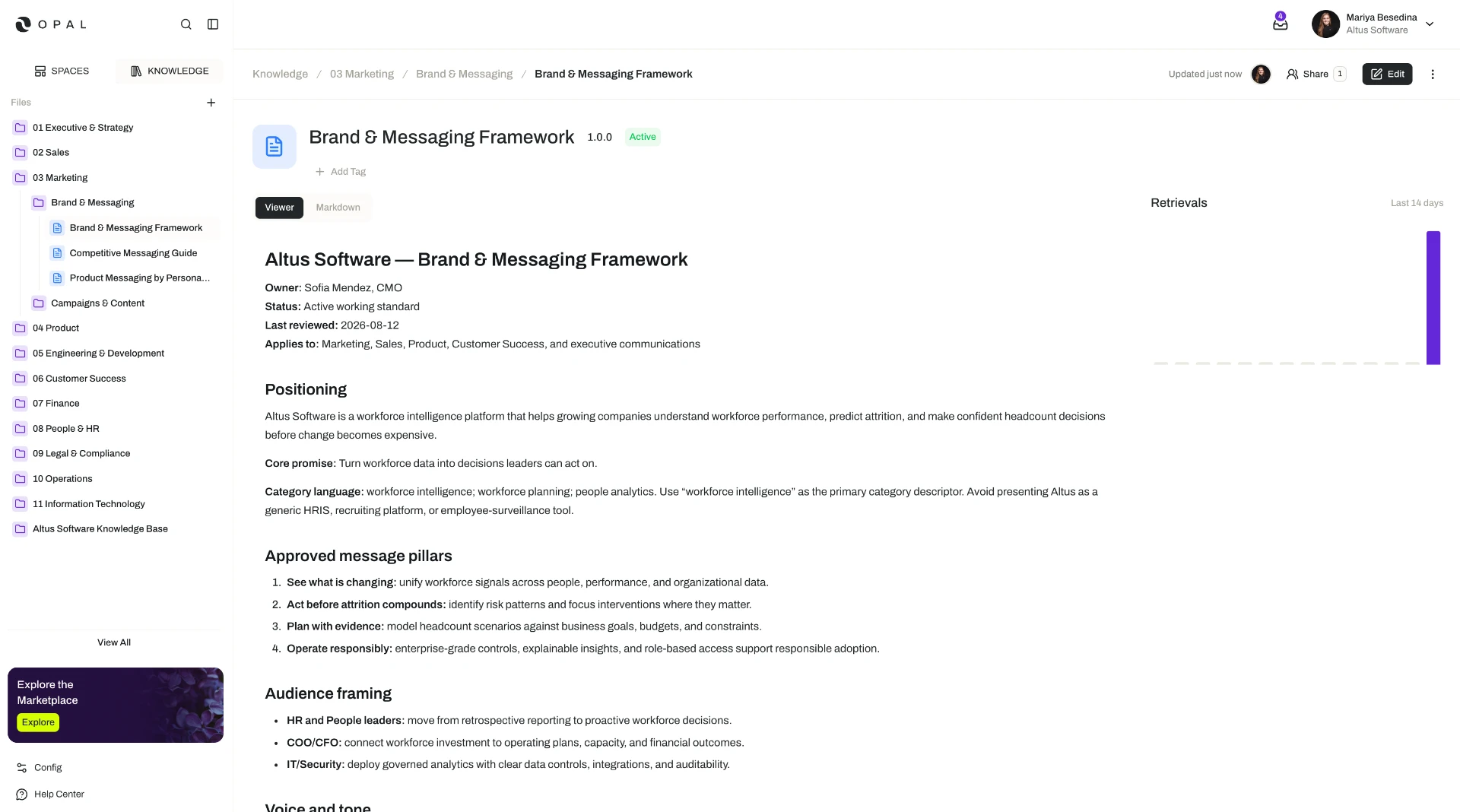
Knowledge is Opal's centralized knowledge base — a single, organized home for the documents, files, and shared context an organization relies on.
What you can see and do in Knowledge depends on your organization's plan, the role permissions you have been granted, and the permissions set on the individual files, folders, and libraries you work with. Sharing that content with other people relies on resource sharing and permissions, available on the Business and Enterprise plans. The access model is documented in one place: Access & Permissions.
Overview
Knowledge is Opal's centralized knowledge base — a single, organized home for the documents, files, and shared context an organization relies on. It is built as a familiar system of files and folders, so filling it up and finding your way around it works much the way it does anywhere else.
What makes it different is who it serves. Knowledge is a source of truth that people and agents work from. The procedure a colleague reads on Tuesday is the same procedure an agent follows when it runs a task on Wednesday night — one copy, reviewed once, used by everyone. That is what removes the familiar problem of the "real" version living in someone's inbox while an out-of-date copy circulates everywhere else.
It also explains why Knowledge is more than a document store. Opal treats knowledge as operational infrastructure — an asset managed across its whole lifecycle, from creation and review through retrieval, execution, and governance — because a digital workforce can only be as reliable as the information it acts on.
This page is the orientation to that system: what the pieces are, how they fit together, and where to read more. Each piece has its own page in this subsection.
Key Capabilities
- Organize content in a familiar structure. Store and organize files in folders in one centralized, file-system-like structure, and rename, move, and archive them as things change. See Files & Folders.
- Group content flexibly with libraries. Create standalone libraries that bring related files and folders together for a particular purpose, without moving them into a single branch of the folder tree. See Libraries.
- Add content by uploading or authoring. Upload files straight from your device, or write new documents inside Opal.
- Turn raw files into usable knowledge. Opal detects the type of every file added — document, image, audio, or video — and offers processing suited to it, such as digitizing a scan into markdown or transcribing a recording. See File Processing.
- Read and edit in an interface built for the format. Each file opens in a viewer and editor tailored to its type, with version history, permissions, and a publishing workflow keeping content controlled. See Viewing & Editing Files.
- Put knowledge to work with agents. Add files and folders to a space so the agents working there can retrieve and use them — and create or edit documents themselves — within threads, tasks, and flows. See Knowledge for Agents.
How it Works
Building and using a knowledge base comes down to four moves.
1. Put the content in. Create folders, upload files from your device, or author new documents directly in Opal. Where a set of related material serves one purpose but does not belong in a single folder, group it as a library instead — a more flexible, decentralized way to bring content together.
2. Let Opal make it usable. When a file is added, Opal automatically detects its type and offers the processing that fits. A scanned PDF can be digitized into markdown with OCR; a recording can be transcribed, with speaker diarization identifying who said what; an image or video can be annotated; an artifact embedded inside a document can be extracted into a file of its own. This is the step that turns content that merely exists into content that can actually be read, searched, and acted on.
3. Keep it trustworthy. Files are viewed and edited in an interface suited to their format, and standard governance controls sit around them: version history, permissions, and a draft-to-published workflow. Work in progress stays in draft until it is reviewed and published, so what everyone else — including agents — picks up is the reviewed version.
4. Put it to work. Knowledge reaches agents through spaces. Add files and folders to a space, and the agents operating there can retrieve and ingest that content while working in threads, tasks, and flows, and can contribute new documents or edits back to the knowledge base as part of their work. Opal also routes each retrieved file in the form the agent's model can actually use: if the model supports the file's format as a native input modality, Opal passes the file directly after confirming compatibility; if it does not — an audio file retrieved by a model without native audio support, for example — Opal supplies a text equivalent, such as the transcription, instead. Nobody has to convert anything by hand.
Additional Notes
- Supported formats. Document formats include PDF, DOCX, XLSX, PPTX, CSV, and MD. Uploaded files are also detected as images, audio, or video.
- Efficiency is handled for you. Behind the scenes, Opal optimizes files for agent retrieval — including caching and token reduction — so agents can draw on a large knowledge base without unnecessary overhead.
- Knowledge is not the same as skills. Skills package reusable instructions and procedures that shape how an agent performs a kind of work. Knowledge is the shared reference content an agent retrieves and acts on. They are complementary: skills shape the method, knowledge supplies the material.
- Read the rest of the subsection in order if you are new to it. Files & Folders and Libraries cover how content is organized, File Processing covers what Opal does with it, Viewing & Editing Files covers working with it day to day, and Knowledge for Agents covers putting it to use — each with its full path in Related Features below.
- Short definitions of the terms used here are in one place: Glossary.
Related Features
- Files & Folders — Adding, organizing, and managing content in the centralized file-and-folder structure. Files & Folders
- Libraries — Standalone, reusable groupings that bring related files and folders together for a particular purpose. Libraries
- File Processing — How Opal detects file types and turns raw uploads into content people and agents can use. File Processing
- Viewing & Editing Files — Reading and editing files in a format-specific interface, with version history, permissions, and the publishing workflow. Viewing & Editing Files
- Knowledge for Agents — How agents retrieve knowledge as grounding context, and contribute documents back, while working. Knowledge for Agents
- Spaces — The operational environment knowledge is added to, giving agents the context and access control they need to use it. Spaces
- Access & Permissions — The full access model behind plans, role permissions, and per-resource permissions. Access & Permissions