
Webhooks
Subscribe to platform events and push them to external systems from Organization Settings.
Webhooks are configured in Organization Settings and send your organization's platform events to external systems, so creating and managing them is an organization-level administrative action. What you can view and change depends on the role permissions you have been granted. The access model is documented in one place: Access & Permissions.
Overview
A webhook is a connection that lets Opal and an external system exchange events. Instead of someone checking Opal to see whether something happened, the systems tell each other.
Webhooks work in two directions, and it helps to keep them apart:
- Outgoing — Opal tells an external system. An organization creates webhooks that subscribe to platform events and sends those events to external systems. These are created and managed at organization level, in Organization Settings, and they are what this page is about.
- Incoming — an external system tells Opal. A task can be triggered by an external event: Opal generates a webhook endpoint, secured with a secret token, that another system calls to run the task. That side is configured on the task itself, and is covered in Tasks.
Two things make outgoing webhooks worth setting up:
- Work stops being invisible outside Opal. The systems your organization already watches — a service desk, a monitoring tool, a data warehouse, an internal service — can be told about platform events as they happen, rather than being reconciled later.
- What was sent is on the record. Every webhook keeps a request log, so you can see the requests it has made, and re-attempt a request when the receiving system missed it.
That combination is why webhooks sit next to the audit log in Opal's picture of an organization: webhooks push events outward to the systems that need to act on them, while the audit log keeps the organization's own traceable record of activity. Governance in Opal is a cross-cutting layer of trust and control rather than something bolted on afterwards, and a webhook is a governed piece of configuration like any other — it lives in Organization Settings, under the organization's role permissions.
A typical example: an operations team subscribes a webhook to the platform events it cares about and points it at an internal service, so that service reacts automatically instead of waiting for someone to notice.
- Subscribe to platform events in Opal
- Events are sent to the external system
- Deliveries appear in the request log
- The external system calls the endpoint
- The call runs a task
- Attempts can be re-tried from the log
Key Capabilities
- Subscribe to platform events. A webhook is created against the platform events the organization wants to hear about.
- Send those events to external systems. Subscribed events are pushed out to the destination you configure, so other systems can act on them.
- See what was sent. Each webhook has a request log recording the requests it has made.
- Re-attempt a request. A request in the log can be re-attempted, so a delivery that did not land does not have to be recreated by hand.
- Reference stored values instead of pasting them in. Variables can be referenced when configuring webhooks, so tokens and configuration values stay in one managed place.
- Trigger work from outside Opal. In the other direction, an incoming webhook endpoint — generated by Opal and secured with a secret token — lets an external event run a task.
- Administer webhooks with everything else. Webhooks sit in Organization Settings alongside the organization's profile and preferences, security, membership, teams and roles, billing, credits, and resource tags.
How it Works
Webhooks belong to the organization. They are created and managed in Organization Settings, the central area where an organization's settings are administered. That placement matters: a webhook sends organization data outward, so it is configured once, centrally, rather than by each team.
Configuring an outgoing webhook, in order.
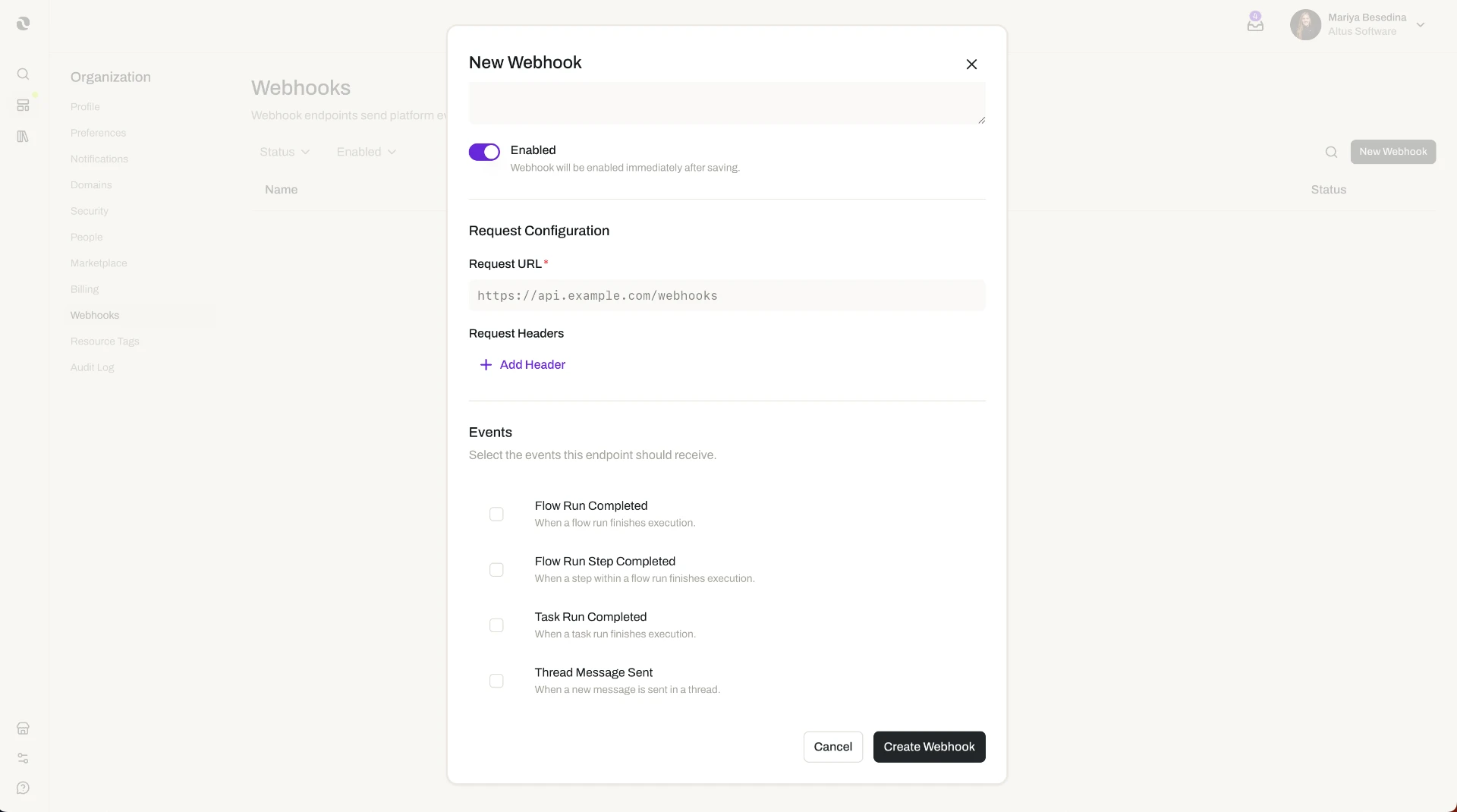
- In Organization Settings, open the webhook settings.
- Create a webhook and point it at the external system that should receive the events.
- Choose the platform events the webhook subscribes to — the things you want that system to hear about.
- Where the configuration needs a token or a configuration value, reference a variable rather than entering the raw value. See Variables.
- Save the webhook. From then on, subscribed events are sent to that destination.
- Use the request log to confirm what has been sent, and re-attempt any request that needs it.
The request log is where webhooks become manageable. Sending events to another system is easy to set up and hard to trust unless you can see what happened. The log gives you that view: which requests the webhook made, and which need attention. When a receiving system was down, misconfigured, or mid-deployment, the fix is usually the same sequence — repair the receiving end, then re-attempt the affected requests rather than trying to reproduce the events.
Variables keep credentials out of the webhook. A webhook that talks to an external service normally needs something to authenticate with. Storing that value once as a variable — with its type set to secret — and referencing it in the webhook means the credential is managed in one place, can be rotated without editing each configuration, and shows the webhook in its Linked Resources panel so the impact of a change is visible before it is made.
A worked example. An IT administrator wants the company's internal operations service to react to activity in Opal instead of someone reporting it. She stores the service's API key as a secret variable, creates a webhook in Organization Settings, points it at the service, and subscribes it to the platform events her team acts on. A week later the service is offline for a scheduled upgrade. Once it is back, she opens the webhook's request log, finds the requests made during the window, and re-attempts them — so the service catches up without anyone reconstructing what happened by hand.
The other direction, briefly. If what you want is for an outside event to start work in Opal, a webhook trigger on a task is the mechanism: Opal generates an endpoint, secured with a secret token, and the external system calls it to run the task. Configure that on the task, not here.
Webhooks and oversight work together. Webhooks push events to the systems that need them; the audit log records organization activity inside Opal so there is a traceable account of what happened. Reach for the audit log when the question is what changed in our organization?, and for a webhook's request log when the question is did the other system get told? See Audit Log.
Additional Notes
- Outgoing and incoming are different features. Organization webhooks send platform events out. An incoming webhook that runs a task is configured on the task and secured with a secret token Opal generates. Mixing the two up is the most common source of confusion here.
- Re-attempting resends a request; it does not repair the receiving system. Fix the destination first, then re-attempt, or the same request will simply fail again.
- Keep credentials in variables. Referencing a variable, rather than entering a value in the webhook, keeps the credential managed and rotatable in one place.
- A webhook does not change who can see anything. Configuring a webhook is an administrative action governed by role permissions; it does not grant or alter access to resources inside Opal. What the receiving system does with the events it is sent is determined by that system.
- Several details are not covered in this documentation. The full list of platform events available to subscribe to, the format of what Opal sends, how a receiving endpoint verifies or authenticates a request, whether failed requests are re-attempted automatically and on what schedule, how long the request log is retained, and any limits on the number of webhooks or destinations are not documented here. Check the webhook settings in Organization Settings for what applies to your organization, and treat anything you cannot confirm there as unverified.
- Short definitions of the terms used here are in one place: Glossary.
Related Features
- Variables — Tokens, credentials, and configuration values stored once at organization level and referenced when configuring webhooks. Variables
- Tasks — Work assigned to an agent that can be triggered by an external event through an incoming webhook endpoint. Tasks
- Audit Log — The organization's traceable record of activity inside Opal, the counterpart to sending events outward. Audit Log
- Resource Tags — Organization-defined labels for classifying resources and filtering to everything that carries a tag. Resource Tags
- Platform Configuration — The cluster this page belongs to: the organization-wide configuration options, including resource tags, variables, and webhooks. Platform Configuration
- Access & Permissions — The full access model behind plans, role permissions, and per-resource permissions. Access & Permissions
- Glossary — Short definitions of the terms used on this page. Glossary